# Usage

### A. Create Pre-validation Request

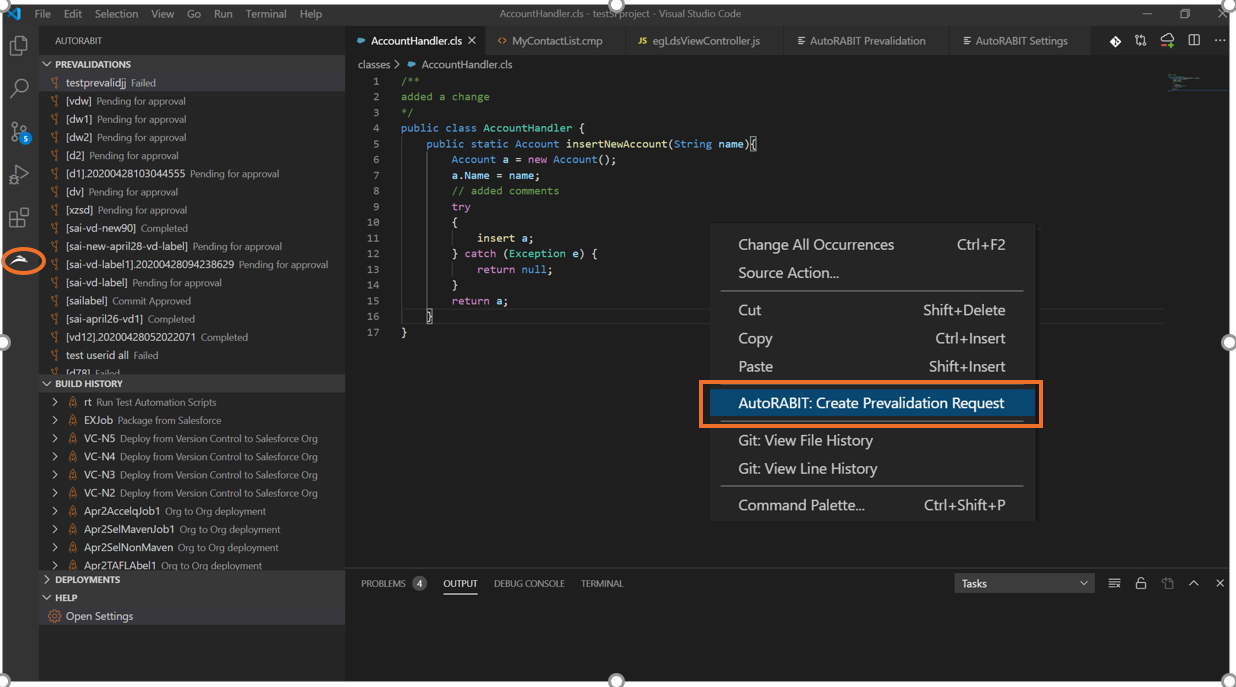
Create a pre-validation request to commit from your local [version control](https://www.autorabit.com/7-tips-for-salesforce-version-control-integration/) repository.

<figure><img src="https://1912836914-files.gitbook.io/~/files/v0/b/gitbook-x-prod.appspot.com/o/spaces%2F9vAxMuDrkUkB4OXlH9CL%2Fuploads%2FD11S8rygUUk4bdbSNOrP%2Fimage.png?alt=media&#x26;token=43272972-6caf-42cc-a3fc-1591892dd869" alt="Pre-validation request creation in VSCode Extension"><figcaption><p>Creating a pre-validation request</p></figcaption></figure>

### B. Stage Changes

#### Stage all changes

<figure><img src="https://1912836914-files.gitbook.io/~/files/v0/b/gitbook-x-prod.appspot.com/o/spaces%2F9vAxMuDrkUkB4OXlH9CL%2Fuploads%2FqIUZbi72RoMFPQA70VHb%2Fimage.png?alt=media&#x26;token=919e6425-498b-4ab2-a0f6-df1e39572cdf" alt="Staging all changes in VSCode Extension"><figcaption><p>Stage all changes</p></figcaption></figure>

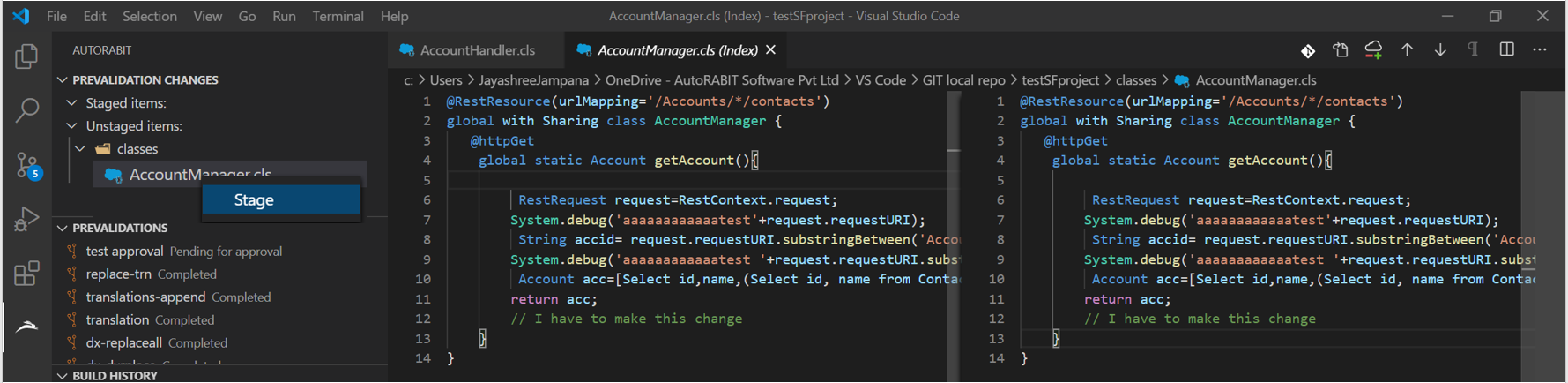
#### Stage changes for a file

<figure><img src="https://1912836914-files.gitbook.io/~/files/v0/b/gitbook-x-prod.appspot.com/o/spaces%2F9vAxMuDrkUkB4OXlH9CL%2Fuploads%2F6rg4YLkOltOP9OYecAYN%2Fimage.png?alt=media&#x26;token=fe6ad20c-fc05-4572-9ab4-c42bc4b5e09f" alt="Staging changes for a single file in VSCode Extension"><figcaption><p>Stage changes for a file</p></figcaption></figure>

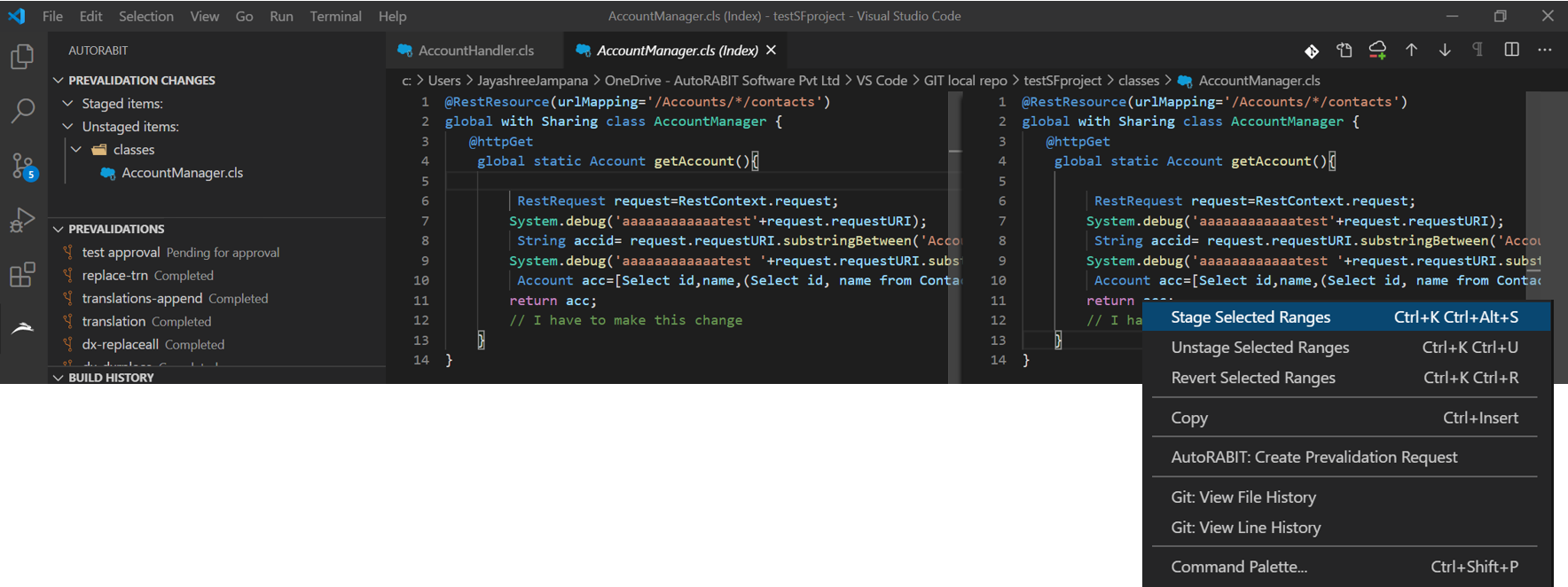
#### Stage selective line of code

<figure><img src="https://1912836914-files.gitbook.io/~/files/v0/b/gitbook-x-prod.appspot.com/o/spaces%2F9vAxMuDrkUkB4OXlH9CL%2Fuploads%2FMDDw9e7qnfh0DLMwwHoA%2Fimage.png?alt=media&#x26;token=d52fb498-3c42-4661-82c4-5597097f77c7" alt="Staging selected lines of code in VSCode Extension"><figcaption><p>Stage selective line of code</p></figcaption></figure>

### C. Submit Pre-validation Request

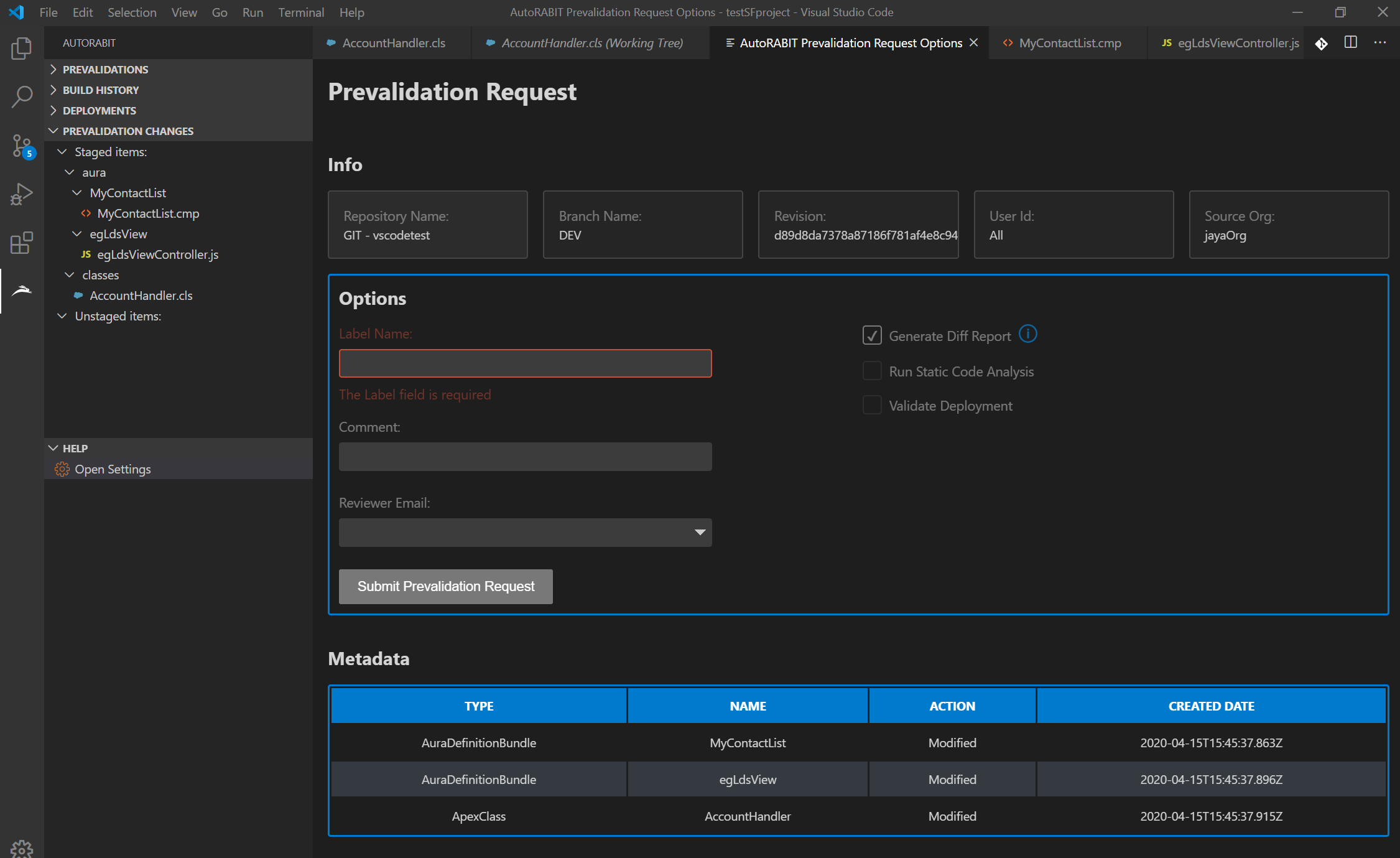
While submitting the pre-validation request, you may choose the following criteria as pre-checks:

1. Generate Diff Report
2. Run Static code analysis
3. Validate deployment

#### Generate Diff report

AutoRABIT compares the metadata between the source org and the destination branch and generates a metadata difference report. The diff report shows a summary of metadata component differences between the org and the branch.

#### Run Static code analysis

[Static code analysis](https://www.codescan.io/blog/what-is-salesforce-static-code-analysis/) detects data flow problems, software defects, language implementation errors, inconsistencies, dangerous usage, coding standard violations, and security vulnerabilities, if any.

#### Validate Deployment

AutoRABIT performs a check-only deployment to your selected org/branch. Nothing is deployed; however, if the deployment fails or tests do not pass, the issues will be clearly shown so they can be resolved.

<figure><img src="https://1912836914-files.gitbook.io/~/files/v0/b/gitbook-x-prod.appspot.com/o/spaces%2F9vAxMuDrkUkB4OXlH9CL%2Fuploads%2FWVYE0tdTtxxf6ZRzYqUS%2Fimage.png?alt=media&#x26;token=6b4fdf7c-ace0-4bfe-8e48-c0b28e172c51" alt="Pre-validation request options in VSCode Extension"><figcaption><p>Submit pre-validation with selected checks</p></figcaption></figure>

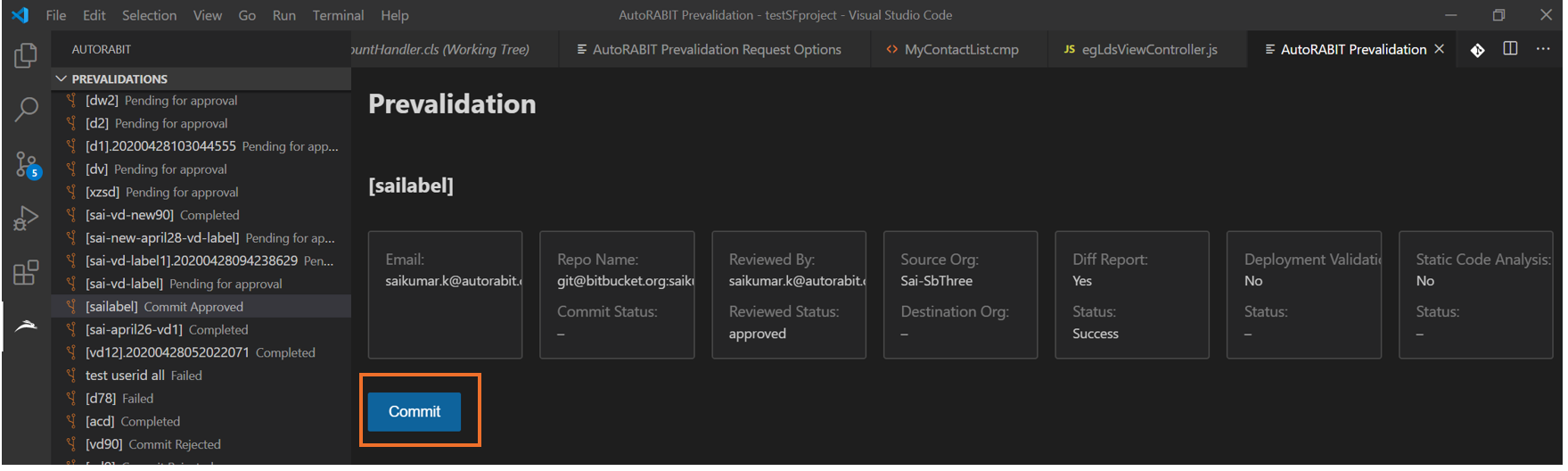
### D. Commit approved pre-validation request

Commit the code once the pre-validation request has been approved.

<figure><img src="https://1912836914-files.gitbook.io/~/files/v0/b/gitbook-x-prod.appspot.com/o/spaces%2F9vAxMuDrkUkB4OXlH9CL%2Fuploads%2FHLotgxkZBWk6x9D0l7I8%2Fimage.png?alt=media&#x26;token=14c6f811-607c-476b-843c-81137a9f2224" alt="Committing approved pre-validation request in VSCode Extension"><figcaption><p>Commit approved request</p></figcaption></figure>

### E. View Pre-validation Requests

#### Diff Report

<figure><img src="https://1912836914-files.gitbook.io/~/files/v0/b/gitbook-x-prod.appspot.com/o/spaces%2F9vAxMuDrkUkB4OXlH9CL%2Fuploads%2Fv4W3FlBD9itDod2u02E7%2Fimage.png?alt=media&#x26;token=26ba34d3-c4ff-41d0-bc75-d474ebf35164" alt="Viewing diff report in VSCode Extension"><figcaption><p>Diff Report</p></figcaption></figure>

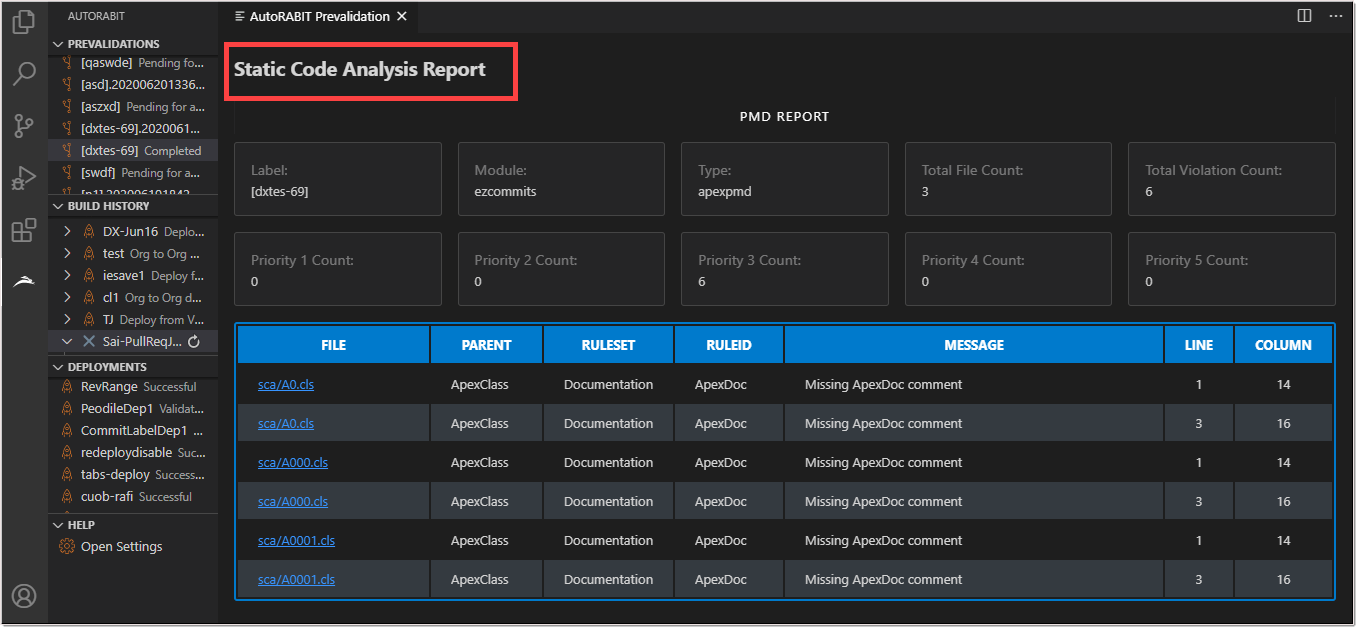
#### Static Code Analysis Report

<figure><img src="https://1912836914-files.gitbook.io/~/files/v0/b/gitbook-x-prod.appspot.com/o/spaces%2F9vAxMuDrkUkB4OXlH9CL%2Fuploads%2F8JUPpKmBQkJhN7PmtVQ8%2Fimage.png?alt=media&#x26;token=524f399f-e177-491a-9da4-1855161cc906" alt="Viewing static code analysis report in VSCode Extension"><figcaption><p>Static Code Analysis Report</p></figcaption></figure>

#### Validate Deployment Report

<figure><img src="https://1912836914-files.gitbook.io/~/files/v0/b/gitbook-x-prod.appspot.com/o/spaces%2F9vAxMuDrkUkB4OXlH9CL%2Fuploads%2F4hZpMYWOcuCAqm7ncV42%2Fimage.png?alt=media&#x26;token=985b2bb0-d2d7-4f73-ad7f-39f239ea46b5" alt="Viewing deployment validation report in VSCode Extension"><figcaption><p>Validate Deployment Report</p></figcaption></figure>

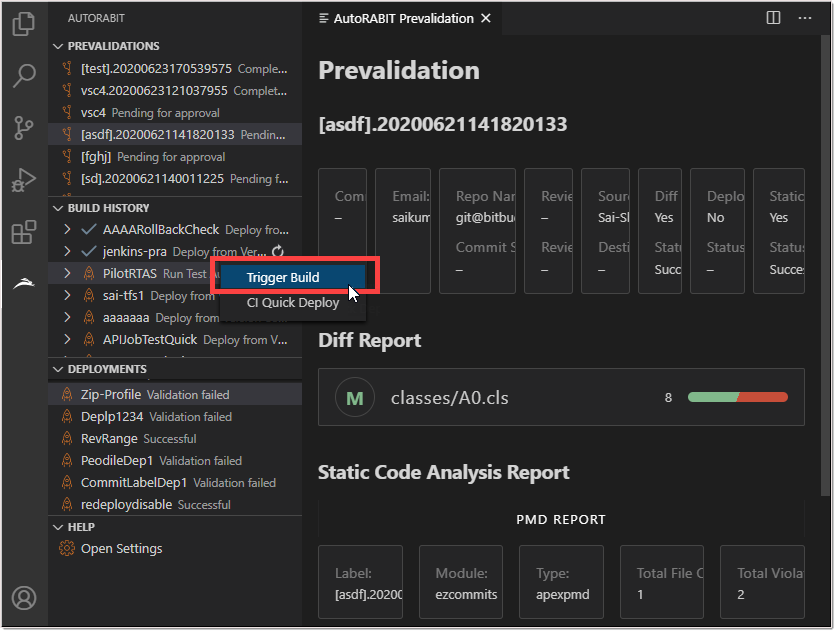
### F. Trigger Build

This extension also allows developers to trigger builds once the code is committed. Actions like Quick Deploy and Abort are available for each build.

<figure><img src="https://1912836914-files.gitbook.io/~/files/v0/b/gitbook-x-prod.appspot.com/o/spaces%2F9vAxMuDrkUkB4OXlH9CL%2Fuploads%2FOqLMkQR8wm30G8HNCGg5%2Fimage.png?alt=media&#x26;token=6e50cb4f-9656-47a0-b1a3-80aab5d5f74f" alt="Triggering builds using VSCode Extension" width="563"><figcaption><p>Triggering a build</p></figcaption></figure>

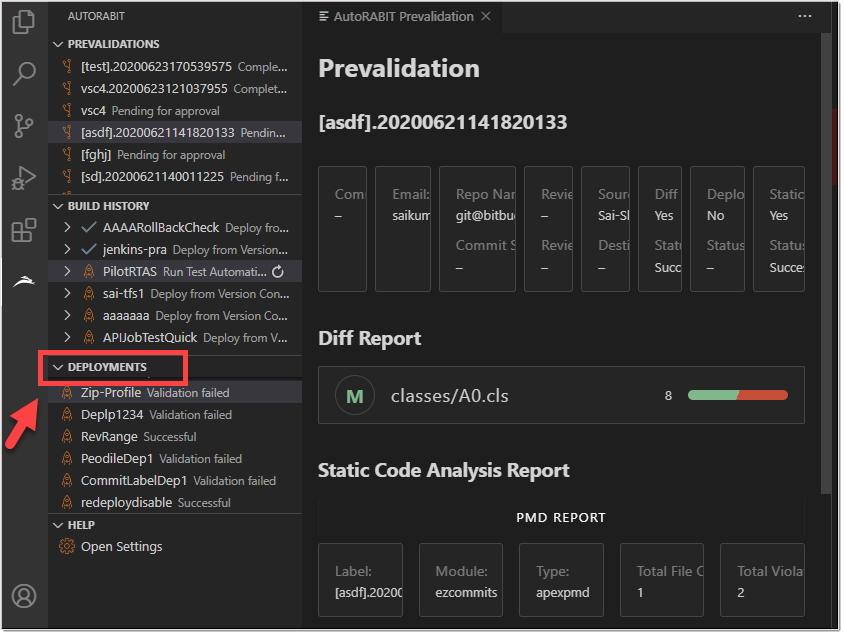
### G. Deployments

Use the extension to view results for pre-validations, builds, and deployments.

<figure><img src="https://1912836914-files.gitbook.io/~/files/v0/b/gitbook-x-prod.appspot.com/o/spaces%2F9vAxMuDrkUkB4OXlH9CL%2Fuploads%2Fg7QXSZ2QiOvLmVoooPn7%2Fimage.png?alt=media&#x26;token=7434a511-deb3-4794-a7c7-3c18ed3aa0ad" alt="Viewing deployment results in VSCode Extension" width="563"><figcaption><p>Viewing deployments</p></figcaption></figure>