> For the complete documentation index, see [llms.txt](https://knowledgebase.autorabit.com/llms.txt). Markdown versions of documentation pages are available by appending `.md` to page URLs; this page is available as [Markdown](https://knowledgebase.autorabit.com/product-guides/arm-1/troubleshoot/how-tos/configure-merge-approval.md).
# Merge Approval
You can enforce this workflow using merge approvals to ensure one or more people approve every merge. Merge approvals allow you to set the necessary approvals that will need to approve every merge in a project.
### Use Cases
* Enforcing review of all code that gets merged into a repository.
* Specifying reviewers for a given proposed code change.
### Configuring Approvals
To configure the merge approvals:
1. Log in to ARM with admin credentials.
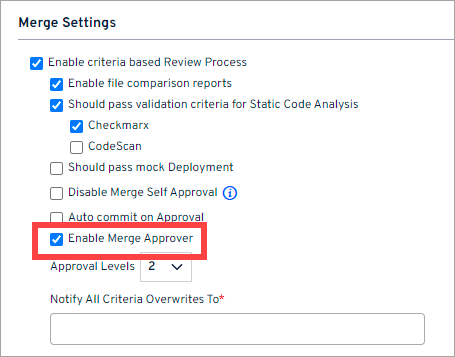
2. Navigate to **Admin > My Account** and expand the **Merge Settings**
3. Tick the **Enable criteria-based Review Process** checkbox.
4. Select the **Enable Merge Approver** checkbox.
5. Set the minimum number of required approvals under the **Approval Level** box. *The minimum **Approval Level** can be **1**.*
6. Click **Save**.
7. The steps above are the minimum required to get approvals working in your merge, but there are a couple more options available that might be suitable to your workflow:
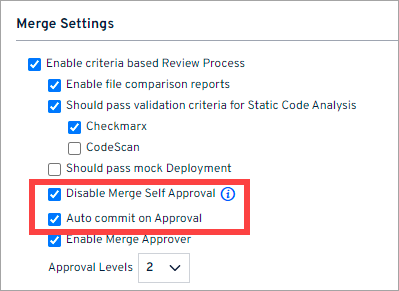
* **Auto commits on Approval:** This option will allow developers to work on their feature branches, and after review (approved), it gets automatically committed to the trunk.
* **Disable Merge Self Approval:** This option will allow you to prevent *EZ-Merge approvers* that have committed to a merge from approving it. However, the Org admins can still view the *approve/reject* option and proceed with all the merges.
### Eligible Approvers
1. No criteria can restrict the **org admin** from approving any merge.
2. The org admin can approve their merges even if the **Disable Merge Self Approval** checkbox is selected.
3. The **EZ-Merge Approver** *(non-admin user)* cannot approve their merges if the **Disable Merge Self Approval** checkbox is selected.
4. No more approval is needed if the approval level is set to 2 and the org admin approves the merge.
5. The L1 and L2 approver email IDs cannot be the same when the approval level is set to 2.
### More Information
The following details pertain to the criteria for commit validation approval:
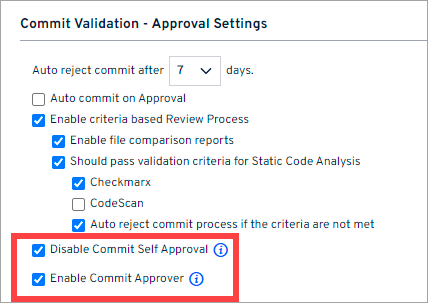
1. There are no restrictions on the **org admin's** ability to approve any prevalidation commits.
2. If the **Disable Commit Self Approval** checkbox is enabled in **Commit Validation - Approval Settings**, the gated check-ins approvers cannot approve their commit unless they are an **org admin**. The org admins can view the *approve/reject* option and proceed with the prevalidation commits.
3. If the **Enable Commit Approver** checkbox is checked, the *admin* and the gated check-ins approver added to the reviewer list will be allowed to approve the prevalidation commits.
---
# Agent Instructions
This documentation is published with GitBook. GitBook is the documentation platform designed so that both humans and AI agents can read, navigate, and reason over technical content effectively. Learn more at gitbook.com.
## Querying This Documentation
If you need additional information that is not directly available in this page, you can query the documentation by asking a question.
Perform an HTTP GET request on the following URL with the `ask` and `goal` query parameters:
```
GET https://knowledgebase.autorabit.com/product-guides/arm-1/troubleshoot/how-tos/configure-merge-approval.md?ask=&goal=
```
`ask` is the immediate question: it should be specific, self-contained, and written in natural language.
`goal` is what the user is ultimately trying to achieve, the reason they need the answer. Sharing it helps GitBook give you a better, more relevant answer. A goal is most helpful when it describes the outcome the user wants rather than restating the question. For example, with `ask=how do I create an API token`, a goal like `automate deployments from our CI pipeline` lets GitBook tailor the answer to that use case.
The response will contain a direct answer to the question and relevant excerpts and sources from the documentation.
Use this mechanism when the answer is not explicitly present in the current page, you need clarification or additional context, or you want to retrieve related documentation sections.