> For the complete documentation index, see [llms.txt](https://knowledgebase.autorabit.com/llms.txt). Markdown versions of documentation pages are available by appending `.md` to page URLs; this page is available as [Markdown](https://knowledgebase.autorabit.com/product-guides/arm/troubleshoot/arm-faqs/ci-jobs.md).
# CI Jobs
### What is the webhook payload URL?
After the 25.3.9 release, the structure of the webhook payload URL was updated. Users need to update the webhook URL in the repository settings of their remote repo. Customers who are still using the old webhook URL containing **autorabitrest** should replace them with API.
Old URL: [https://na25.autorabit.com/**autorabitrest**/webhook/triggerSCMPushrequest](https://na25.autorabit.com/autorabitrest/webhook/triggerSCMPushrequest)
Updated URL: [https://na25.autorabit.com/**api**/webhook/triggerSCMPushrequest](https://na25.autorabit.com/api/webhook/triggerSCMPushrequest)
Unless you update the payload URL, you may face pull request/trigger build-on-commit jobs triggering.
### What are the benefits of using Quick Deploy?
When you run a validation deployment through ARM, it will pre-run all unit tests. The Quick Deploy option then allows you to skip those tests in the final production release, knowing they passed previously. Using the Quick Deploy option reduces the amount of time the Production org is locked.
### When is the Quick Deploy option available in a CI Job?
Quick deployments are available when the following requirements are met:
* The components have been successfully validated for the target environment.
* As part of the validation, Apex tests in the target org have passed.
* Code coverage requirements are met.
* If all tests in the org or all local tests are run, overall code coverage is at least *75%*, and Apex triggers have some coverage.
* If specific tests are run with the *Run specified tests* test level, each class and trigger that was deployed is covered by at least 75% individually.
* The "Prevent Deployment" checkbox is NOT selected in the CI Job setting.
### Why am I getting a popup saying, "Not Eligible for Quick Deploy," after selecting Quick Deploy in the CI Job?
This error will occur when the "Prevent Deployment" checkbox is enabled in the CI Job setting. Deselect the checkbox, then proceed with the Quick Deploy.
### Why am I not receiving email notifications for all CI jobs that AutoRABIT has initiated?
You might have exceeded the maximum number of recipients; the maximum number of recipients should not exceed 50. Remove some of the recipients from the mail notification list and run the CI job again; you should now receive email notifications.
### Why is it taking longer to build CI jobs triggered on PR submission as compared to CI jobs triggered on Commit?
**Build on Commit Job:** When a user creates a CI job on one branch, for example, *Integration*, if any **Commits** are made on that branch on the remote, we will only perform the **Pull (Delta changes)** and then prepare the **Package**. This is why the build time is shorter.
**Build on PR Submission:** When a CI job is created on the base branch, for example, *Integration*, if the developer works on the **Feature 1** branch and creates the **Pull Request (PR)** on the **Integration** branch, then the job gets triggered in ARM. The branch will switch to the **Feature 1** branch, take the clone of the entire branch, prepare the changes between the two branches, and then switch back to the master branch when the job is completed. This is why the build time is longer for PR jobs.
### Why are the FLS changes in the CI job reflected in the diff file but not in the sandbox?
This usually happens if the **Ignore missing visibility** checkbox is selected in CI Jobs. Another possibility is that the field in question is unavailable in the destination org where the FLS was deployed. Please contact our support team to determine the root cause and assist you further.
### Why am I unable to push components from a branch to an org in a CI Job? What is the ‘Maximum size of request reached’ error?
This error may be due to a file size limitation. We suggest you break deployments down into smaller chunks to be successful. Please refer to the Salesforce article below about the file size limits for deployments: [Salesforce Developers](https://developer.salesforce.com/docs/atlas.en-us.salesforce_app_limits_cheatsheet.meta/salesforce_app_limits_cheatsheet/salesforce_app_limits_platform_metadata.htm#:~:text=The%20maximum%20size%20of%20the,size%20limit%20is%20400%20MB.).
### How do User Credentials impact different types of CI Jobs?
Listed below are the different types of CI Jobs and their corresponding credential usage:
#### **Forced/Manually Triggered Build:**
The CI job process will consider the triggered **User Credential,** which is mapped with the respective Repo and Branch in the **My Profile** section.\
\
If the credentials are invalid/expired, authentication fails and an error message is displayed upon build initiation.\
\
To resolve this issue, the user initiating the build must update the credentials in **My Profile** and perform a **Test Connection**. If it is successful, reinitiate the CI Job
#### **Build on Commit and Scheduled CI Job:**
The CI Job process will consider the last modifying user's credentials, which are mapped with the respective Repo and Branch in the **My Profile** section.\
\
If the credentials are invalid/expired, the CI Job build fails and authentication error message is displayed in the CI Job Build log.\
\
To resolve this issue, the user who last modified the CI Job must update the credentials in **My Profile** and perform a **Test Connection**. If it is successful, the job will be executed in the next cycle.
#### **CI Job Build Initiated From API:**
The CI Job process will consider the **Token** user credential, which is mapped with the respective Repo and Branch in the **My Profile** section.\
\
If the credentials are invalid/expired, the CI Job build fails and an authentication error message is displayed in the CI Job Build log.\
\
To resolve this issue, user generating the token must update the credentials in **My Profile** and perform a **Test Connection**. If it is successful, the job will be executed in the next cycle.
### Why is CI Jobs deploying a metadata type I deselected in the "Exclude Metadata Types" section?
If you have deselected a metadata type but it is still being deployed in CI jobs, then it could be because of a different name. Please verify that the **folderName** committed in Git is correct for the metadata. This should resolve the issue. If it doesn’t, contact our support team for further analysis.
### Why is a CI job for production deployment running random test classes, even though there are no Apex classes in the build, causing the deployments to fail?
You might have selected the option to **Include default Apex tests for run test based on changes** under **Admin**-->**Salesforce settings**, so even though there are no classes present in the package, it's still running default classes for code coverage. This is an expected behavior.
### Why am I getting an error while trying to access CI job builds more than 3 months old?
The reason you are unable to get the details of specific builds older than 3 months is due to ARM’s **Retention Policy**. There are some details which are archived and become unretrievable.
You can change the retention period to 6 months or 12 months from the **Admin** section of your ARM account.
### Why is a CI job failing with an error during validation?
The deployment may fail if it does not detect the metadata root folder path ‘src.’ Please update the Branch settings and then re-save the CI Job.
You can then perform a Merge Request to trigger the CI job and validate the deployment.
### How do I include destructive changes in a CI job?
Review this [Knowledge Base article](/product-guides/arm/arm-features/deployment/destructive-changes.md), which covers performing destructive changes through CI jobs.
### The "File Changes" tab shows that the Quick Actions metadata type is deleted. Why isn’t this reflected in the Destructive Changes tab or the package xml?
This may be a **GIT** behavior where the **QuickAction** metadata members are added and deleted again. As per GIT behavior, when it has to generate the delta between **From** and **To** revisions, in the case of a conflict, it skips such files from package preparation.
There is no Git logic under **File Diff** because it simply displays what was **added/modified/deleted** for better UI visibility to understand the changes and be reviewed.
You can work around this by **updating the baseline** revision **CI job** and using **Single Revision** in the **Deployment** module.
### **Why am I not getting a package for the CI Job?**
Packages will only be displayed in CI jobs if created or imported through our application's SFDX -> Packages module. This ensures that we accurately track packages and their versions.
To create or import the package, refer to the following articles:
* Create a Package: [Create an Unlocked/Managed Package | AutoRABIT Knowledge Base](https://knowledgebase.autorabit.com/product-guides/arm/arm-features/salesforce-dx/create-an-unlocked-managed-package)
* Import a Package: [Import an Unlocked/Managed Package | AutoRABIT Knowledge Base](https://knowledgebase.autorabit.com/product-guides/arm/arm-features/salesforce-dx/import-an-unlocked-managed-package)
### **Can I update or remove picklist values with my CI Job?**
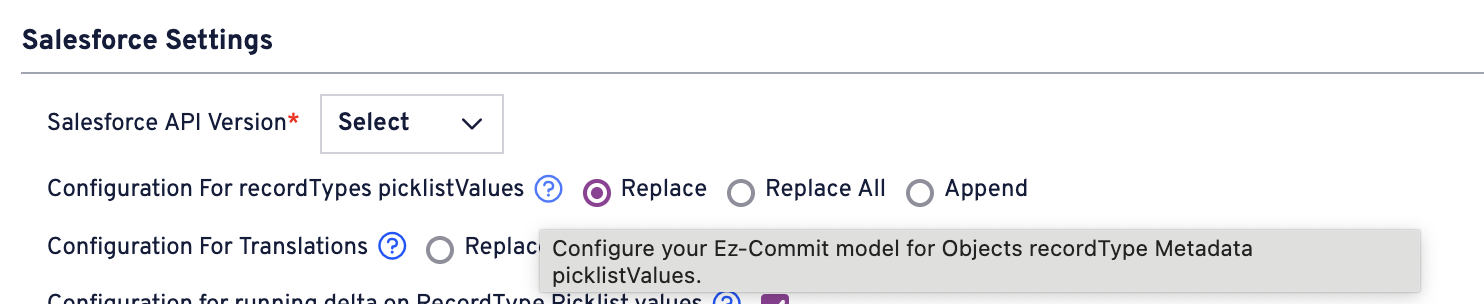
Since Salesforce does not retrieve deleted/deactivated picklist values in a metadata API call, replacing the picklist values via BackUp to VersionControl CI Job is impossible. However, a best practice in replacing the Picklist values is using the EZ-Commit module.
This configuration for RecordType PicklistValues option only works in the EZ-Commit module. If picklist values need to be replaced, use this approach.
Refer to [How to Configure Record Types Picklist Values](https://knowledgebase.autorabit.com/product-guides/arm/troubleshoot/how-tos/configure-record-types-picklist-values) for more information.
### Why is my CI Job failing when using an application token?
The **Application Token** credential type is **not supported for ARM CI Jobs**.\
It is intended only for **enterprise Jira integration** using a Personal Access Token (PAT).\
Do **not** configure Application Token as the credential type for CI Jobs. For CI Jobs, use supported SCM credentials (for example, **Username and Password or others**) instead.
### Why is only one repository visible when creating a CI Job?
Repository visibility depends on the **CI job type** selected.
* For a **non-DX** CI job, only **non-DX repositories** are shown.
* For an **SFDX** CI job, only **DX repositories** are shown.
### How does ARM determine file changes for CI Jobs and post-deployment merges?
**Files Changed vs. Check-in Changes in a CI Job**
For a CI Job, ARM performs a Git diff between the commit from the previous build and the current commit that triggered the build.
The differences identified by this Git diff determine the changes that are processed and deployed as part of the CI Job. Therefore, the components displayed under the **Files Changed** tab may differ from the modified files shown in the **Check-in** details.
This behavior is expected because the deployment scope is determined by the Git diff between the relevant build commits rather than solely by the files associated with the current check-in.
**Changes Considered During a Post-Deployment Merge**
A post-deployment merge works differently from the deployment process.
When the post-deployment merge step is executed, ARM sends a merge request to Git to merge the applicable source and destination branches. During this operation, Git evaluates the files modified between the branches. The merge is not limited to only the components displayed under the **Files Changed** tab for the CI Job.
As a result, if modified files contain conflicting changes between the source and destination branches, Git identifies them as merge conflicts. These conflicts are then reflected in ARM.
---
# Agent Instructions
This documentation is published with GitBook. GitBook is the documentation platform designed so that both humans and AI agents can read, navigate, and reason over technical content effectively. Learn more at gitbook.com.
## Querying This Documentation
If you need additional information that is not directly available in this page, you can query the documentation by asking a question.
Perform an HTTP GET request on the following URL with the `ask` and `goal` query parameters:
```
GET https://knowledgebase.autorabit.com/product-guides/arm/troubleshoot/arm-faqs/ci-jobs.md?ask=&goal=
```
`ask` is the immediate question: it should be specific, self-contained, and written in natural language.
`goal` is what the user is ultimately trying to achieve, the reason they need the answer. Sharing it helps GitBook give you a better, more relevant answer. A goal is most helpful when it describes the outcome the user wants rather than restating the question. For example, with `ask=how do I create an API token`, a goal like `automate deployments from our CI pipeline` lets GitBook tailor the answer to that use case.
The response will contain a direct answer to the question and relevant excerpts and sources from the documentation.
Use this mechanism when the answer is not explicitly present in the current page, you need clarification or additional context, or you want to retrieve related documentation sections.