> For the complete documentation index, see [llms.txt](https://knowledgebase.autorabit.com/llms.txt). Markdown versions of documentation pages are available by appending `.md` to page URLs; this page is available as [Markdown](https://knowledgebase.autorabit.com/product-guides/guard/features/governance/data-classification.md).
# Data Classification
### Overview
AutoRABIT Guard’s Data Classification enhances your organization's ability to identify and manage sensitive data within Salesforce environments. By automatically classifying and categorizing data based on sensitivity and compliance requirements, AutoRABIT supports your data governance and security strategies.
### Key Capabilities
* **Automated Data Classification**\
Instantly scans your Salesforce org—including all custom fields across all objects—and classifies them against key regulations:
* **PCI**
* **HIPAA**
* **GDPR**
* **COPPA**
* **CCPA**
* **PersonalInfo**
* **PII**
* **Regulation-Based Filtering**\
Use the **Relevant Regulations** filter to quickly identify which fields align with specific compliance standards.
* **Object-Based Filtering**\
Select to review fields based on specific Objects.
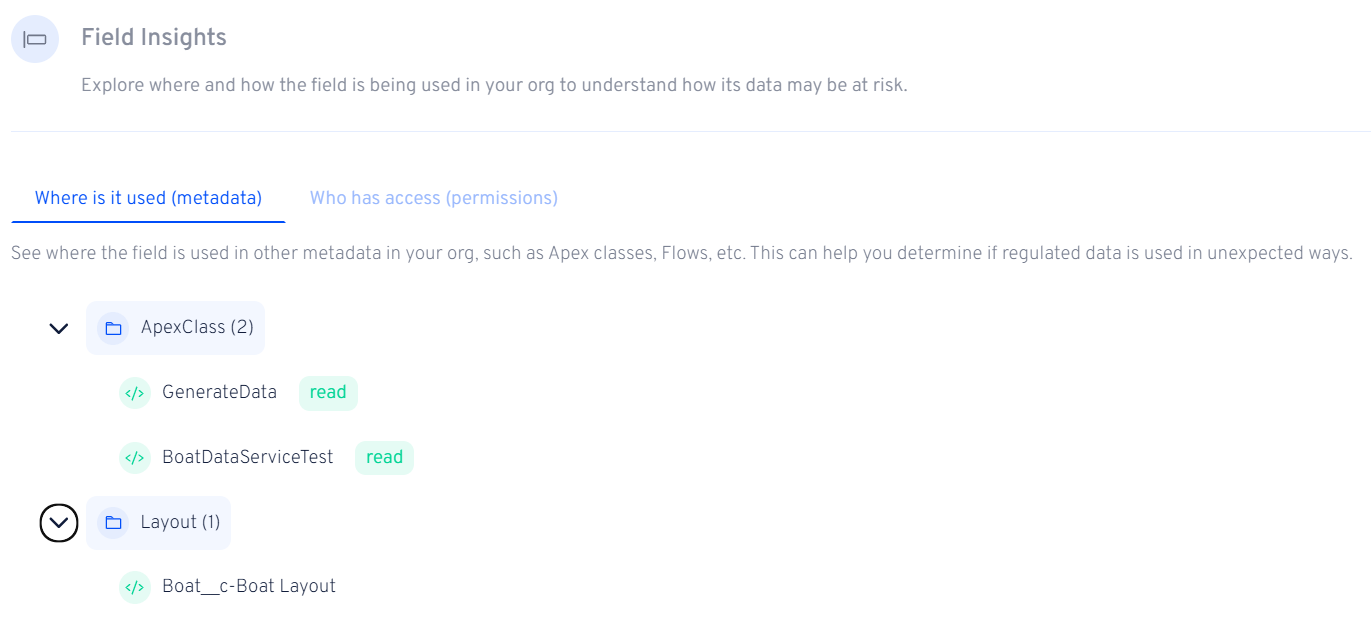
* **Field Insights: Know What's Really Happening**\
For each classified field, Guard provides detailed context on how it matches a specific regulation—going beyond static definitions.\
\
Why It Matters? It's not enough to know a field is sensitive—you need to know how widely it's used and in what contexts. Guard tells you:
* **Where the field lives**: See where the field appears across your org in Page Layouts, Apex Classes, Flows, Validation Rules, etc.
Field Usage
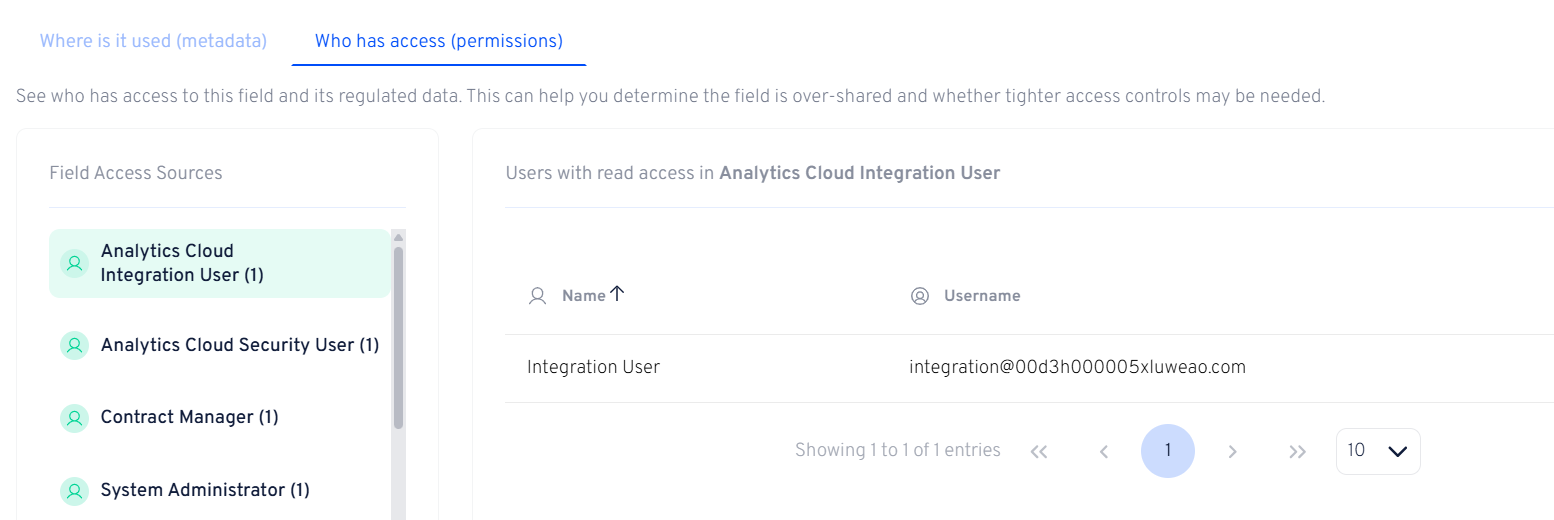
* **Access Visibility: See Who Has Keys**\
Even well-protected data becomes a risk if too many people have access to it. With Guard, you can instantly view which Profiles, Permission Sets, and Permission Set Groups have access to a sensitive field.
Access Visibility
### Getting Started
To use Data Classification in Guard:
1. **Navigate** to the Data Classification module within the Compliance section.
2. **Salesforce Org**: Select one of your orgs registered in Guard
3. **Run Data Scans**: Your organization is scanned automatically, but you can also Refresh data manually as needed
4. **Review and Act**: Use filters to analyze classification results and implement necessary security controls or policy adjustments.
### New Capabilities
#### Deep Data Scanning
In addition to analyzing field metadata, AutoRABIT Guard now supports **Deep Data Scanning**, which allows classification based on the data stored in Salesforce fields.
Sensitive information often resides within free-text or unstructured fields such as *Comments*, *Notes*, or custom text fields. Deep Data Scanning enables Guard to analyze field values and detect regulated data patterns such as email addresses, phone numbers, or other sensitive content.
**Note:** Deep Data Scanning is disabled by default and can only be enabled by contacting AutoRABIT Support.
* **Automatic Deep Data Scanning**
When enabled, customers can define common field name patterns (for example, *comments*, *notes*, *info*). Guard automatically identifies matching fields and scans recent non-empty records to determine whether regulated data is present.
* **Manual Data Scan**
For greater control, Guard allows **manual data scans** to be initiated directly from a field’s detail page. This enables users to perform a one-time analysis on a specific field and review the results on demand. Scan progress and findings are clearly displayed in the field details view.
#### Custom Regulations Context
Guard also supports **custom regulations**, enabling customers to classify data against organization-specific, regional, or internal compliance requirements defined in the Salesforce org.
In addition to default regulations, customers can provide Guard with contextual information for custom regulations to improve classification accuracy.
**Custom regulation capabilities include:**
* Viewing custom and default regulations in Data Classification settings
* Adding or editing regulation descriptions to explain the intent of the regulation
* Providing sample field names to guide how data should be classified
These definitions are automatically applied in future data scans, ensuring classifications align more closely with real-world compliance needs.
### Benefits
* **Increased Visibility**: Ensures sensitive data is appropriately classified and ready to be analyzed.
* **Regulatory Compliance**: Facilitates adherence to data protection laws by providing clear visibility into data types and their associated handling requirements.
* **Operational Efficiency**: Reduces manual efforts in data identification and classification, allowing teams to focus on strategic initiatives.
* **Risk Mitigation**: Identifies potential data exposure risks, enabling proactive measures to prevent data breaches.
### Conclusion
AutoRABIT's Data Classification feature empowers organizations to gain deeper insights into their data landscape, ensuring sensitive information is managed appropriately and in compliance with relevant regulations.
---
# Agent Instructions
This documentation is published with GitBook. GitBook is the documentation platform designed so that both humans and AI agents can read, navigate, and reason over technical content effectively. Learn more at gitbook.com.
## Querying This Documentation
If you need additional information that is not directly available in this page, you can query the documentation dynamically by asking a question.
Perform an HTTP GET request on the current page URL with the `ask` query parameter, and the optional `goal` query parameter:
```
GET https://knowledgebase.autorabit.com/product-guides/guard/features/governance/data-classification.md?ask=&goal=
```
`ask` is the immediate question: it should be specific, self-contained, and written in natural language.
`goal` is optional and describes the broader end goal you are ultimately trying to accomplish on behalf of the user. GitBook uses it to tailor the answer towards what is most useful for that goal.
The response will contain a direct answer to the question and relevant excerpts and sources from the documentation.
Use this mechanism when the answer is not explicitly present in the current page, you need clarification or additional context, or you want to retrieve related documentation sections.