> For the complete documentation index, see [llms.txt](https://knowledgebase.autorabit.com/llms.txt). Markdown versions of documentation pages are available by appending `.md` to page URLs; this page is available as [Markdown](https://knowledgebase.autorabit.com/product-guides/guard/getting-started-with-guard/integration-user-license.md).
# Integration User
### Why Use an Integration User License for Guard?
Guard automates security actions in your Salesforce org, helping adhere to security policies and automatically remediating issues. To ensure that these actions are properly attributed and not mixed up with individual user activities, we recommend using a Salesforce Integration User License.
The Integration User License is a special license in Salesforce meant exclusively for integration users, allowing external systems like Guard to interact with your Salesforce org. By using this license, all actions performed by Guard are clearly attributed to the integration user, ensuring accurate and transparent audit logs.
{% hint style="info" %}
A Salesforce org can be connected to Guard using a System Administrator Profile, as it provides all required permissions for the integration. However, many organizations choose to configure a dedicated Integration User for this purpose, in line with common Salesforce best practices. Using a separate Integration User can help distinguish integration activity from individual user activity and align with internal governance or security policies.
{% endhint %}
### Setting Up an Integration User for Guard
To ensure Guard can properly access and manage security policies in your Salesforce org, you need to assign the correct Integration User License and permissions.
#### 1. Assign the Salesforce Integration User License
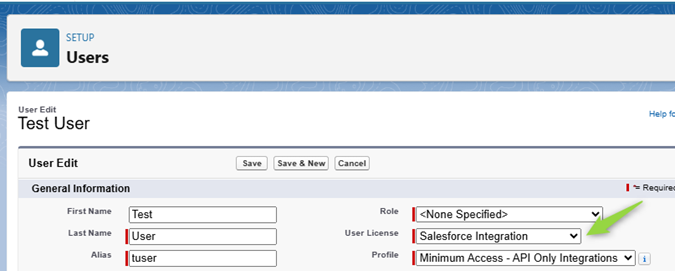
The Integration User License is a special Salesforce license designed for automated processes, like Guard. By using this license, all actions performed by Guard are attributed to a dedicated integration user, keeping audit logs clean and ensuring proper access control.\
\
By default, the Salesforce Integration Profile (which comes with this license) only includes basic API access. It does not grant access to standard or custom objects in your org. That’s where the next step comes in.
Integration User License
#### 2. Assign the Salesforce API Integration Permission Set License (PSL)
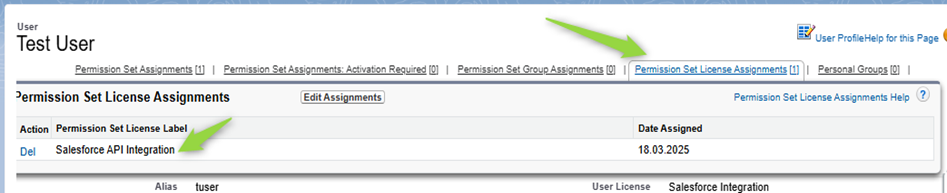
Since the Integration User License alone does not provide access to objects and permissions needed by Guard, you must assign the Salesforce API Integration Permission Set License (PSL).
Assign the Salesforce API Integration Permission Set License
The Salesforce API Integration PSL includes administrative permissions that were originally part of the System Administrator profile but are now assigned separately. This license enables the integration user to be assigned additional permissions via permission sets.
#### 3. Assign the Required Permission Set
A Permission Set defines specific access to Salesforce objects and features. Once the Salesforce API Integration PSL is assigned, proceed to create and assign a Permission Set that grants the Integration user permissions required for the Guard application.
{% hint style="info" %}
A Salesforce System Administrator profile already includes the permissions Guard needs, including View All Profiles and View Setup Audit Trail. If you use a dedicated Integration User, make sure these permissions are included in the permission set assigned to that user.
{% endhint %}
| Product Area | Permissions Required | Rationale |
| ------------------------------------------------- | ------------------------------------------------------------------------------------------------------------------------------------------ | ------------------------------------------------------------------------------------------------------------------------------------------------------------------------------------------------------------------------------------------------------------------------------------------------------------------------------------------------------------------------------------------------------------------------------------------------------------------------------------------------------------------------------------------------------------------------------------------------------------------------------------------------------------------------------------------------------------------------------------------------------------------ |
| Connecting a Salesforce Org to Guard | Approve Uninstalled Connected Apps OR Use Any API Client OR Create, Edit, and Delete External Client Apps OR Download AppExchange Packages |
The very first time an admin connects to the AutoRABIT Connected App, this permission is required so that Salesforce does not block the connection.
For connected-app authorisation, the authorising user must also have Customize Application and either Modify All Data or Manage Connected Apps.
Once the connection is established, the admin should formally install the app and grant access through profile and permission sets. Future users will not need this permission.
An alternative is to use the AutoRABIT External Client App. To create the external client app manually, you need Create, Edit, and Delete External Client Apps. To install a managed package with the ECA, you need Download AppExchange Packages.
|
| Risk Assessment | (Modify All Data OR Modify Metadata Through Metadata API Functions), View Health Check, Manage Password Policies, View All Profiles |
The Risk Assessment uses the Metadata API to scan the metadata of an org and find misconfigurations.
Access to the Metadata API requires either Modify All Data or Modify Metadata Through Metadata API Functions.
To categorise and remediate some of the misconfigurations, View Health Check and Manage Password Policies are required.
From Winter '27, Salesforce enforces Enable Profile Filtering. Without View All Profiles, Guard can only see the integration user's own profile details where Profile data is queried, which can lead to partial results without a Salesforce error.
|
| Automated Data Classification | Customize Application (Optional) | Automated Data Classification automatically classifies custom fields against major regulations. This doesn't require any specific user permissions. To sync the regulations back to Salesforce, Customize Application is required because the sync edits the custom field definitions. |
| Access Control Policies / Authorization Policies | Assign Permission Sets | This feature allows Guard to remove permission sets from unauthorized users. To remove permission set assignments, Assign Permission Sets is required. |
| Permissions Explorer | View Setup and Configuration, Assign Permission Sets, Manage Users, View All Profiles |
This feature queries the PermissionSetAssignment object to show user access patterns. As per Salesforce official docs, this object is restricted to users with these permissions.
From Winter '27, Salesforce enforces Enable Profile Filtering. Without View All Profiles, Guard can only see the integration user's own profile details where Profile data is queried, which can lead to partial results without a Salesforce error.
|
| API Dashboard | Customize Application | This page queries the OauthToken Tooling API object, which requires the Customize Application permission. |
| User Security Overview / User Activity Monitoring | View Setup and Configuration, Assign Permission Sets, Manage Users, View All Profiles |
Similar to other features mentioned above, this page requires access to user details, profile details, login history, permission set assignments and more. These are governed by the permissions on the left.
From Winter '27, Salesforce enforces Enable Profile Filtering. Without View All Profiles, Guard can only see the integration user's own profile details where Profile data is queried, which can lead to partial results without a Salesforce error.
From Spring '27, Salesforce enforces the View Setup Audit Trail permission for SetupAuditTrail SOQL queries. Existing profiles and permission sets that already have View Setup and Configuration are auto-granted this permission, but new users may need it added explicitly.
|
| Public File Exposure | No specific permissions required | Salesforce applies the following access rules: |
| Digital Experience Assessment | Modify All Data OR View All Data OR Create and Set Up Experiences OR membership of each Experience Cloud site | Users with Modify All Data, View All Data or Create and Set Up Experiences can see all sites in the org. |
{% hint style="info" %}
The Integration User requires elevated permissions to allow Guard to access and evaluate Salesforce configuration, security settings and user access controls. These permissions are necessary for the application to function as intended and provide full visibility into the org’s security and configuration posture.
{% endhint %}
If a permission set is assigned **without** the required PSL, you’ll receive an assignment error.\
\
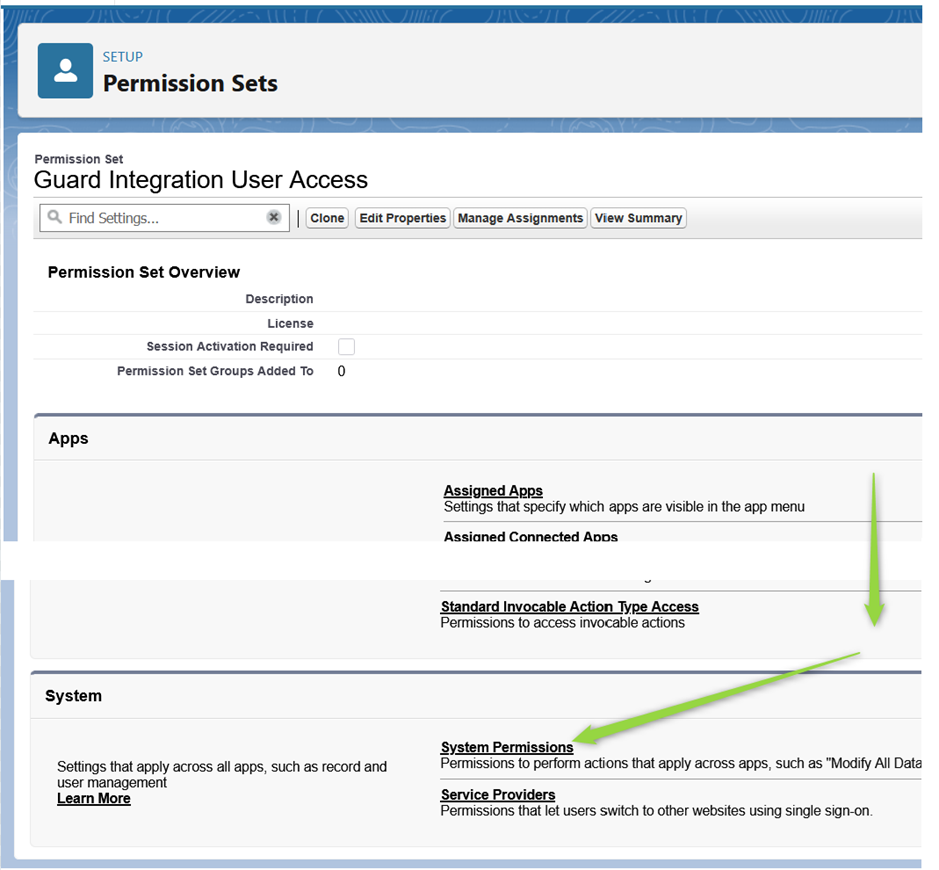
To assign needed permissions, open the Permission Set created for integration users and proceed to System Permissions:
Permission Set Overview
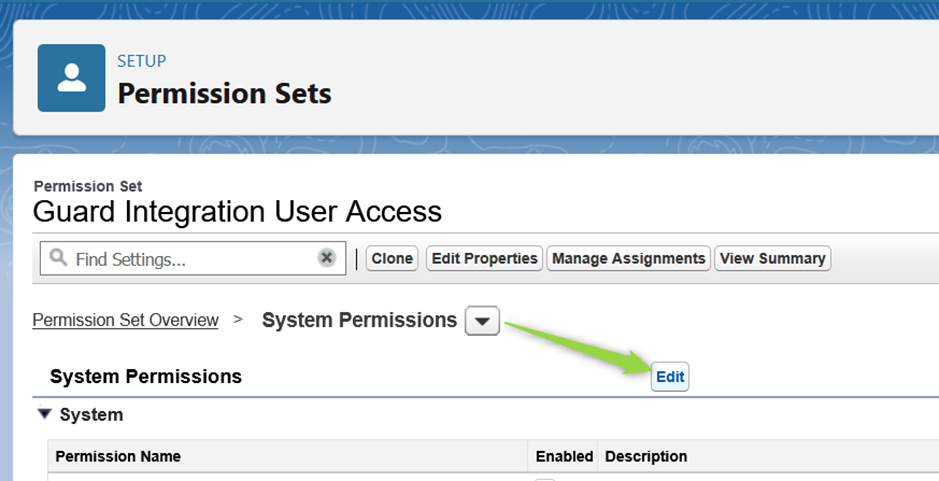
Click Edit to update permissions:
Edit System Permissions
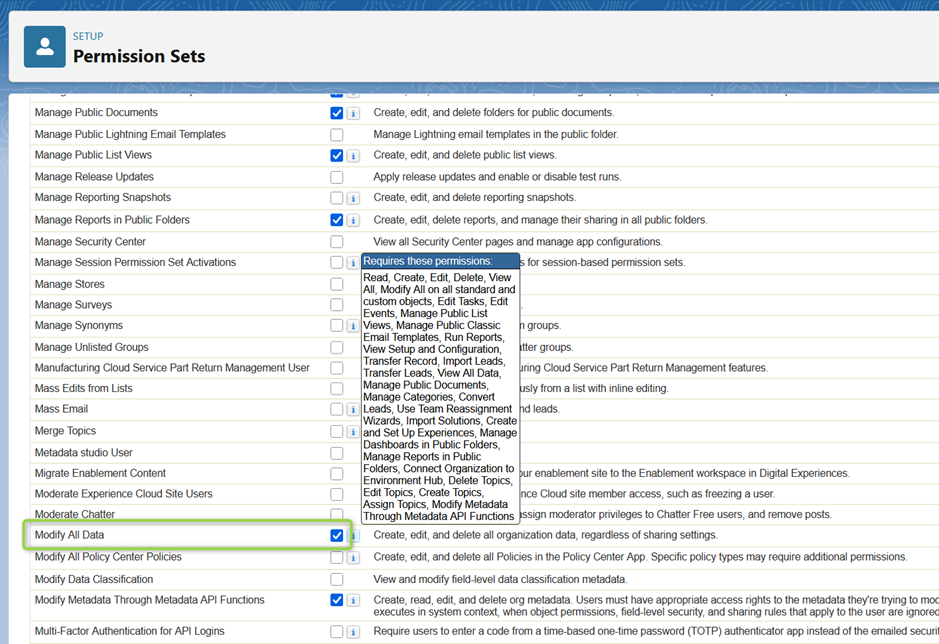
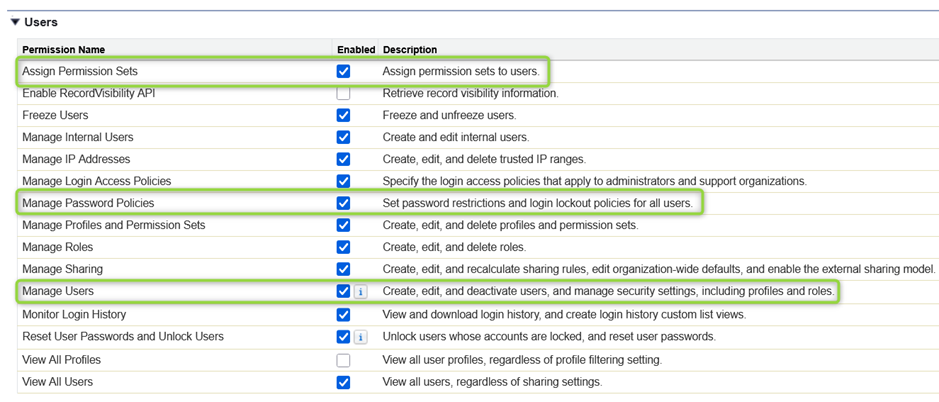
Make sure to enable all the permissions mentioned above. They are located under both the **System** and **Users** groups:
Permission Sets - Modify All Data
Permissions - Users
Once all listed permissions are enabled, please save the changes and assign this Permission Set to the Integration user.
---
# Agent Instructions
This documentation is published with GitBook. GitBook is the documentation platform designed so that both humans and AI agents can read, navigate, and reason over technical content effectively. Learn more at gitbook.com.
## Querying This Documentation
If you need additional information that is not directly available in this page, you can query the documentation by asking a question.
Perform an HTTP GET request on the following URL with the `ask` and `goal` query parameters:
```
GET https://knowledgebase.autorabit.com/product-guides/guard/getting-started-with-guard/integration-user-license.md?ask=&goal=
```
`ask` is the immediate question: it should be specific, self-contained, and written in natural language.
`goal` is what the user is ultimately trying to achieve, the reason they need the answer. Sharing it helps GitBook give you a better, more relevant answer. A goal is most helpful when it describes the outcome the user wants rather than restating the question. For example, with `ask=how do I create an API token`, a goal like `automate deployments from our CI pipeline` lets GitBook tailor the answer to that use case.
The response will contain a direct answer to the question and relevant excerpts and sources from the documentation.
Use this mechanism when the answer is not explicitly present in the current page, you need clarification or additional context, or you want to retrieve related documentation sections.