> For the complete documentation index, see [llms.txt](https://knowledgebase.autorabit.com/llms.txt). Markdown versions of documentation pages are available by appending `.md` to page URLs; this page is available as [Markdown](https://knowledgebase.autorabit.com/product-guides/integral-zone/iz-suite/administration/global-settings/subscription.md).
# Subscription
The **Subscription** tab shows your IZ Suite licence: whether it is active, until when it is valid, which platforms and modules it enables, and how much of each allowance you have used. Administrators use it to plan renewals and spot modules that are running out.
Open it from **Administration** → **Global Settings** → **Subscription** in the sidebar.
Licence overview
{% hint style="warning" %}
You need a role that can view global settings to open this tab.
{% endhint %}
## Licence Summary
| Item | Description |
| ------------------------ | ------------------------------------------------------------------------------------------------------------------------------------------------------------------------------------------------------- |
| Status | **Your licence is active** with an **Active** tag, or the expired state. |
| **Valid until** | The date the licence ends. |
| **Enabled modules** | Enabled modules out of all modules in the licence. |
| **Licensed platforms** | How many platforms the licence covers. Click the number to list them and open one. |
| Version | The IZ Suite version the server runs. |
| **View licence details** | Opens **Licence details**: status, validity, IZ Suite version, enabled modules, **Last licence check**, **Allowances near or at their limit**, **Modules without an allowance** and **Unused modules**. |
The summary also warns you when:
* the licence expires within 30 days, or has expired: contact Integral Zone to renew it;
* the required licence check is overdue: allowances may be set to 0 until a check succeeds;
* some modules need attention: click **Review usage** to show them.
## Actions
| Button | Description |
| ----------------------------------------- | --------------------------------------------------------------------------------------------- |
| **Subscribe to licence updates** | Subscribes you to notifications about licence changes. |
| **Manage Subscriptions** (megaphone icon) | Manages who is subscribed to licence updates. Needs a role that can manage all subscriptions. |
| **Refresh licence** | Re-reads your entitlements from the IZ licence service after you confirm. |
{% hint style="danger" %}
When you refresh the licence, modules missing from the entitlement are disabled immediately, together with their scheduled work. If a module was added recently, check the licence contents with Integral Zone first.
{% endhint %}
## Platform Coverage
Each card is a platform (for example Anypoint Platform, AWS, Azure, Kubernetes or Service Health) with the number of enabled modules, its most used allowances as a percentage, and the total number of allowances. A platform without metered allowances, such as Change Assurance, shows **Included capabilities** and **View coverage** instead.
* Use **Search modules** to find a module or allowance.
* Choose **Licensed** (platforms in your licence), **Needs attention** (modules near or at a limit, or without an allowance) or **All modules**.
* Click a card to open the platform.
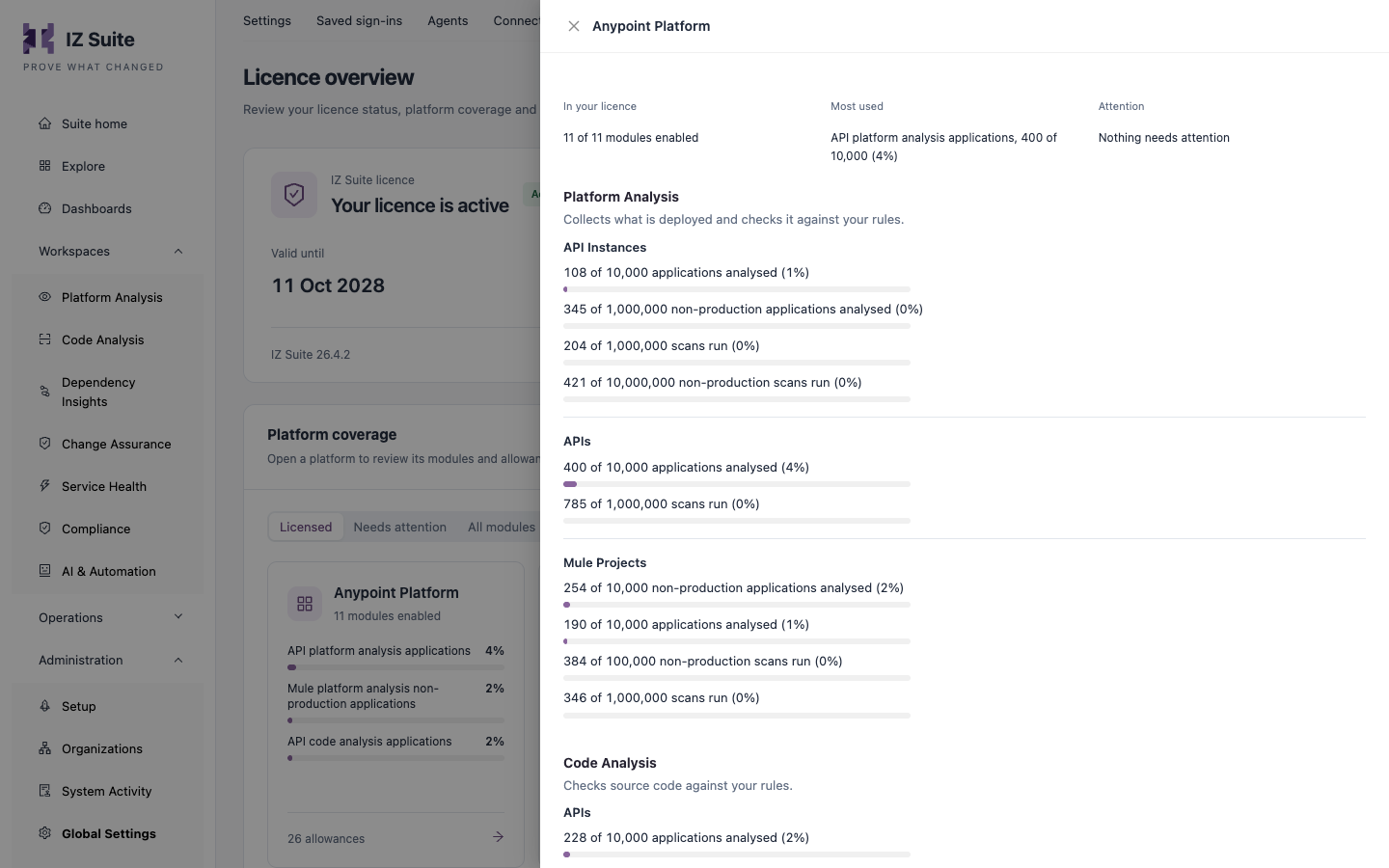
A platform's modules and allowances
The platform drawer shows **In your licence** (enabled modules), **Most used** (the allowance closest to its limit) and **Attention**, then the modules grouped by product (for example Platform Analysis and Code Analysis). Each allowance shows how much is used out of how much is allowed, such as applications analysed or scans run.
A module carries a tag only when something is exceptional:
| Tag | Meaning |
| -------------------------------- | ---------------------------------------------------------------------------------------- |
| **Not in your licence** | The module is not enabled. |
| **At its limit** | An allowance is fully used. |
| **Allowance is 0** | The module is enabled but its allowance is 0. |
| **No allowance in your licence** | The module is enabled but has no allowance, so the first application or scan is refused. |
| **Running out** | An allowance is close to its limit. |
| **Never used** | Nothing has been used yet. |
**IDE keys from this licence** at the bottom of the tab opens [IDE Keys](https://knowledgebase.autorabit.com/product-guides/integral-zone/iz-suite/administration/global-settings/ide-keys.md).
## Next Steps
* [IDE Keys](https://knowledgebase.autorabit.com/product-guides/integral-zone/iz-suite/administration/global-settings/ide-keys.md): assign the IDE keys that come with your licence.
* [Organization Subscriptions](https://knowledgebase.autorabit.com/product-guides/integral-zone/iz-suite/operations/notifications/organization-subscriptions.md): manage who receives notifications.
* [Global Settings](https://knowledgebase.autorabit.com/product-guides/integral-zone/iz-suite/administration/global-settings.md): the other configuration screens.
---
# Agent Instructions
This documentation is published with GitBook. GitBook is the documentation platform designed so that both humans and AI agents can read, navigate, and reason over technical content effectively. Learn more at gitbook.com.
## Querying This Documentation
If you need additional information that is not directly available in this page, you can query the documentation by asking a question.
Perform an HTTP GET request on the following URL with the `ask` and `goal` query parameters:
```
GET https://knowledgebase.autorabit.com/product-guides/integral-zone/iz-suite/administration/global-settings/subscription.md?ask=&goal=
```
`ask` is the immediate question: it should be specific, self-contained, and written in natural language.
`goal` is what the user is ultimately trying to achieve, the reason they need the answer. Sharing it helps GitBook give you a better, more relevant answer. A goal is most helpful when it describes the outcome the user wants rather than restating the question. For example, with `ask=how do I create an API token`, a goal like `automate deployments from our CI pipeline` lets GitBook tailor the answer to that use case.
The response will contain a direct answer to the question and relevant excerpts and sources from the documentation.
Use this mechanism when the answer is not explicitly present in the current page, you need clarification or additional context, or you want to retrieve related documentation sections.