> For the complete documentation index, see [llms.txt](https://knowledgebase.autorabit.com/llms.txt). Markdown versions of documentation pages are available by appending `.md` to page URLs; this page is available as [Markdown](https://knowledgebase.autorabit.com/product-guides/integral-zone/iz-suite/administration/system-activity/entity-archives.md).
# Entity Archives
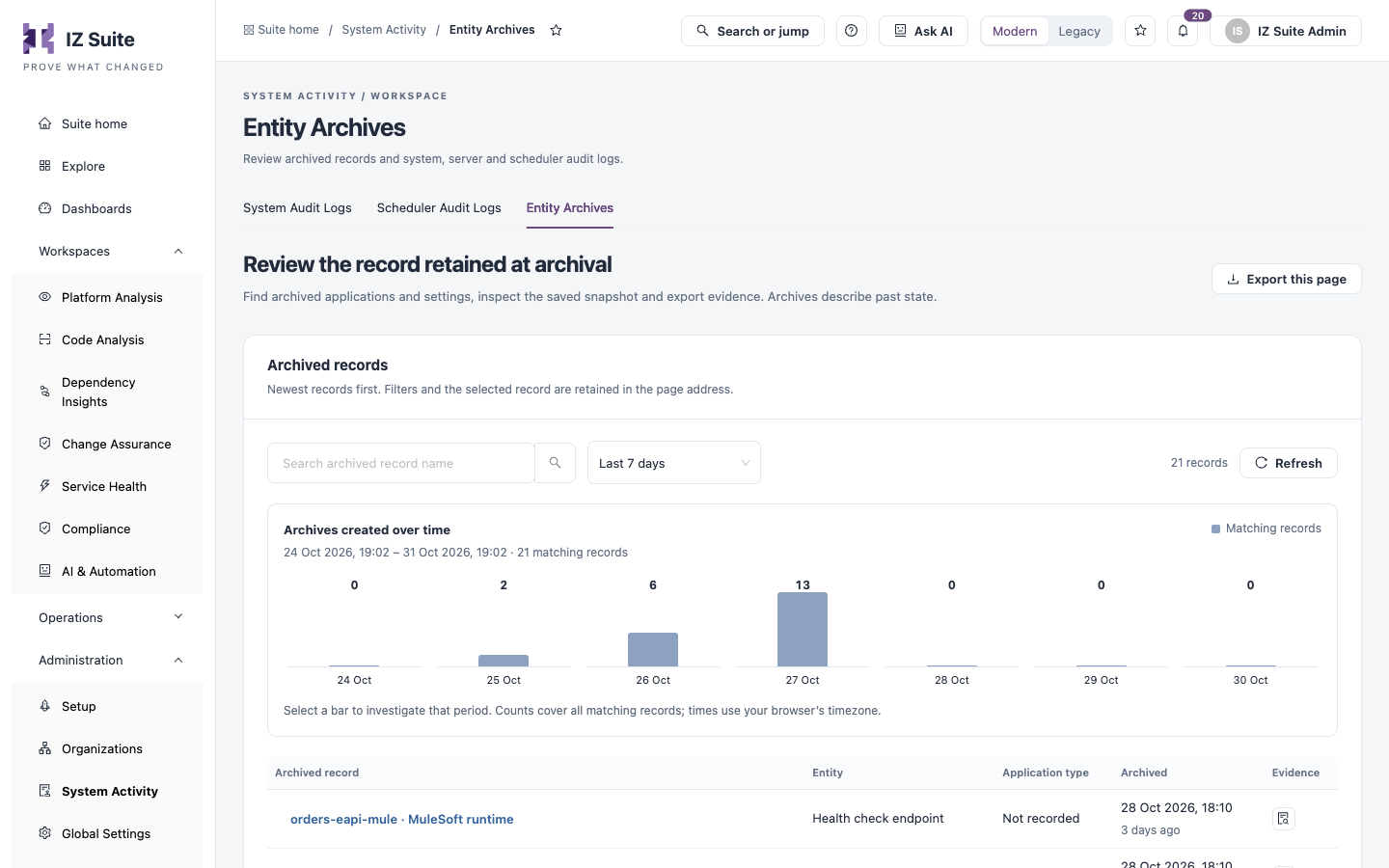
When IZ Suite archives a record, for example an application, a setting or a health check endpoint, it keeps a snapshot of that record as it was at that moment. **Entity Archives** lists those snapshots so you can find an archived record, inspect what it contained and export it as evidence. Archives describe past state; nothing here restores a record.
Open it from **Administration** → **System Activity** → **Entity Archives** in the sidebar.
Entity Archives
{% hint style="warning" %}
You need a role that can view entity archives.
{% endhint %}
## Filters
| Filter | Description |
| ------------------------------- | ------------------------------------------------------------------------------------------------------------- |
| **Search archived record name** | Finds archived records by name. |
| Time window | **Last 24 hours**, **Last 7 days** (default), **Last 30 days**, **Custom range** or **All retained history**. |
**Archives created over time** charts the archived records per period. Click a bar to investigate that period. **Saved filters**, **Refresh** and **Export this page** work as on the other tabs.
## Archived Records
Newest records first.
| Column | Description |
| -------------------- | ---------------------------------------------------------- |
| **Archived record** | The record's name. |
| **Entity** | The kind of record, for example **Health check endpoint**. |
| **Application type** | The application type, when the record has one. |
| **Archived** | When the record was archived. |
| **Evidence** | **Inspect snapshot** opens the archive drawer. |
## Inspect a Snapshot
Archive evidence
1. Click **Inspect snapshot** on the row.
2. Review **Name**, **Entity type**, **Application type**, **Archived** and **Archive identity**.
3. Under **Saved snapshot**, read the record as it was saved. Use **Find a value or message in this record** to search it.
4. Click **Download evidence** to save the complete snapshot.
Search affects the preview only; the download includes the complete recorded evidence. If a record is unavailable, it may have expired under the retention policy.
{% hint style="info" %}
What is archived, and when, follows the archival policies in global settings. For example, older scans, completed one-time job executions and older audit logs are archived after their retention period.
{% endhint %}
## Next Steps
* [Scheduler Audit Logs](https://knowledgebase.autorabit.com/product-guides/integral-zone/iz-suite/administration/system-activity/scheduler-audit-logs.md): check that archival tasks ran.
* [System Audit Logs](https://knowledgebase.autorabit.com/product-guides/integral-zone/iz-suite/administration/system-activity/system-audit-logs.md): find who changed a record before it was archived.
* [System Activity](https://knowledgebase.autorabit.com/product-guides/integral-zone/iz-suite/administration/system-activity.md): the other tabs.
---
# Agent Instructions
This documentation is published with GitBook. GitBook is the documentation platform designed so that both humans and AI agents can read, navigate, and reason over technical content effectively. Learn more at gitbook.com.
## Querying This Documentation
If you need additional information that is not directly available in this page, you can query the documentation by asking a question.
Perform an HTTP GET request on the following URL with the `ask` and `goal` query parameters:
```
GET https://knowledgebase.autorabit.com/product-guides/integral-zone/iz-suite/administration/system-activity/entity-archives.md?ask=&goal=
```
`ask` is the immediate question: it should be specific, self-contained, and written in natural language.
`goal` is what the user is ultimately trying to achieve, the reason they need the answer. Sharing it helps GitBook give you a better, more relevant answer. A goal is most helpful when it describes the outcome the user wants rather than restating the question. For example, with `ask=how do I create an API token`, a goal like `automate deployments from our CI pipeline` lets GitBook tailor the answer to that use case.
The response will contain a direct answer to the question and relevant excerpts and sources from the documentation.
Use this mechanism when the answer is not explicitly present in the current page, you need clarification or additional context, or you want to retrieve related documentation sections.