> For the complete documentation index, see [llms.txt](https://knowledgebase.autorabit.com/llms.txt). Markdown versions of documentation pages are available by appending `.md` to page URLs; this page is available as [Markdown](https://knowledgebase.autorabit.com/product-guides/vault/autorabit-vault-freemium/backup.md).
# Backup
## AutoRABIT Vault Backup Job Creation User Guide
*Create and start a backup job from an existing backup configuration*
## Purpose
Backup Job Creation allows a backup job to be started from the Backup module after the required Salesforce org, environment, and backup configuration are selected. The workflow opens the Start Backup dialog, confirms the backup details, starts the job, and displays the created backup record in the Backup Summary.
## Before Beginning
A source org and backup configuration must already be available. The Backup Jobs page uses the selected Salesforce Org, Environment, and Configurations values to display the related backup records and to start a new backup for the selected configuration.
## Create a Backup Job
The Backup module opens on the Backup Jobs page. The page displays the selected Salesforce Org, Environment, and Configurations values at the top of the workspace. The Backup Summary table lists existing backup jobs for the selected configuration. When no backup has been created for the current selection, the table displays an empty state.
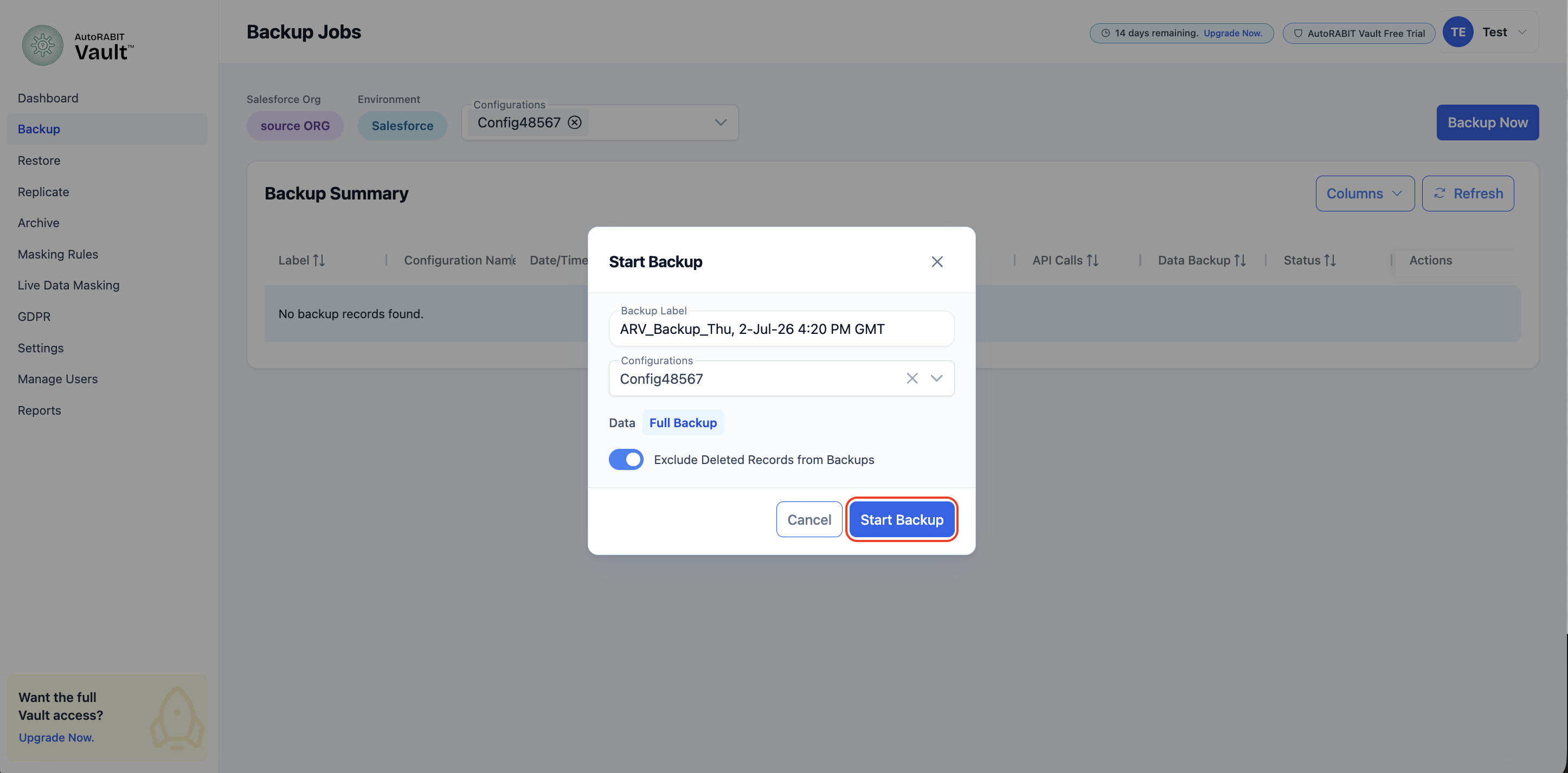
Selecting Backup Now opens the Start Backup dialog. AutoRABIT Vault automatically generates a Backup Label and carries forward the selected configuration into the Configurations field. The dialog provides the review point before the backup job is started.
The Configurations field supports selection or confirmation of the backup configuration that must be used for the job. After the configuration is selected, the Data section displays Full Backup as the backup type. The Exclude Deleted Records from Backups option remains available to control whether deleted records are excluded from the backup processing.
## Start the Backup
Selecting Start Backup submits the backup request. During submission, the Start Backup button shows an in-progress state to indicate that AutoRABIT Vault is processing the request and creating the backup job.
After the request is accepted, AutoRABIT Vault closes the dialog and displays a confirmation notification indicating that the backup has started. The Backup Summary refreshes with the created backup record. The record displays the backup label, configuration name, date and time, expiry date, duration, record count, API calls, data backup indicator, status, and available actions.
## Important Considerations
Backup jobs are created only for the currently selected Salesforce Org, Environment, and Configurations values.
The generated Backup Label can be reviewed before the job is started.
The Exclude Deleted Records from Backups option determines whether deleted records are excluded during backup processing.
The Backup Summary reflects the job after AutoRABIT Vault accepts the backup request.
---
# Agent Instructions
This documentation is published with GitBook. GitBook is the documentation platform designed so that both humans and AI agents can read, navigate, and reason over technical content effectively. Learn more at gitbook.com.
## Querying This Documentation
If you need additional information that is not directly available in this page, you can query the documentation by asking a question.
Perform an HTTP GET request on the following URL with the `ask` and `goal` query parameters:
```
GET https://knowledgebase.autorabit.com/product-guides/vault/autorabit-vault-freemium/backup.md?ask=&goal=
```
`ask` is the immediate question: it should be specific, self-contained, and written in natural language.
`goal` is what the user is ultimately trying to achieve, the reason they need the answer. Sharing it helps GitBook give you a better, more relevant answer. A goal is most helpful when it describes the outcome the user wants rather than restating the question. For example, with `ask=how do I create an API token`, a goal like `automate deployments from our CI pipeline` lets GitBook tailor the answer to that use case.
The response will contain a direct answer to the question and relevant excerpts and sources from the documentation.
Use this mechanism when the answer is not explicitly present in the current page, you need clarification or additional context, or you want to retrieve related documentation sections.