> For the complete documentation index, see [llms.txt](https://knowledgebase.autorabit.com/llms.txt). Markdown versions of documentation pages are available by appending `.md` to page URLs; this page is available as [Markdown](https://knowledgebase.autorabit.com/product-guides/arm-1/arm-features/webhooks/configuring-a-webhook-in-bitbucket-enterprise.md).
# Bitbucket Enterprise
The following documentation is specific to Bitbucket Enterprise customers.
{% hint style="info" %}
As of 9 September 2025, app username and passwords have been deprecated as a type of authentication method. However, as of 9 June 2026, all existing app passwords will be disabled. Users are required to create API tokens and migrate this function prior to the deadline to avoid disruptions: .
{% endhint %}
{% hint style="info" %}
After the 25.3.9 release, the structure of the webhook payload URL was updated. Customers need to update the webhook URL in the repository settings of their remote repo. Some customers are still using the old webhook URL containing **autorabitrest**, which should now be replaced with api.
Example:
Old URL: [https://na25.autorabit.com/**autorabitrest/**webhook/triggerSCMPushrequest](https://na25.autorabit.com/autorabitrest/webhook/triggerSCMPushrequest)
Updated URL: [https://na25.autorabit.com/api/webhook/v2/\/trigger-scm-push-request](https://na25.autorabit.com/api/webhook/v2//trigger-scm-push-request)
Unless you update the Payload URL, you might face pull request/trigger build-on-commit jobs triggering.
{% endhint %}
## A. Create a Webhook API Token in ARM
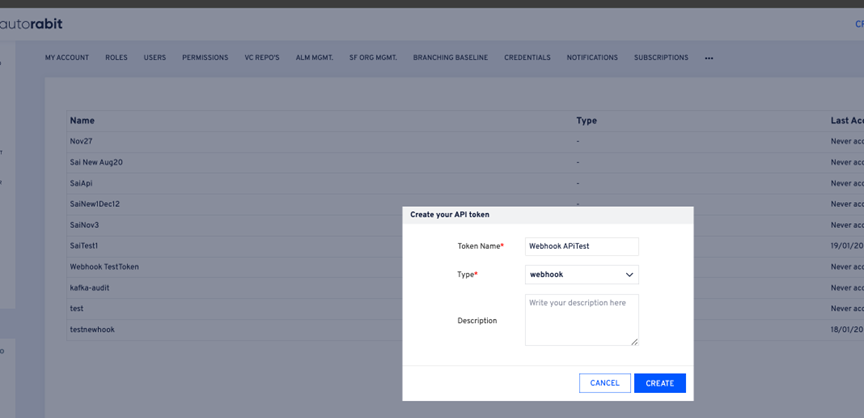
1. Log in to ARM.
2. Navigate to **Admin Section > API Token**.
3. Click **Create API Token**.
4. Enter a **Token Name**.
5. Select **Type** as **webhook**.
6. (Optional) Add a **Description**.
7. Click **Create Option**.
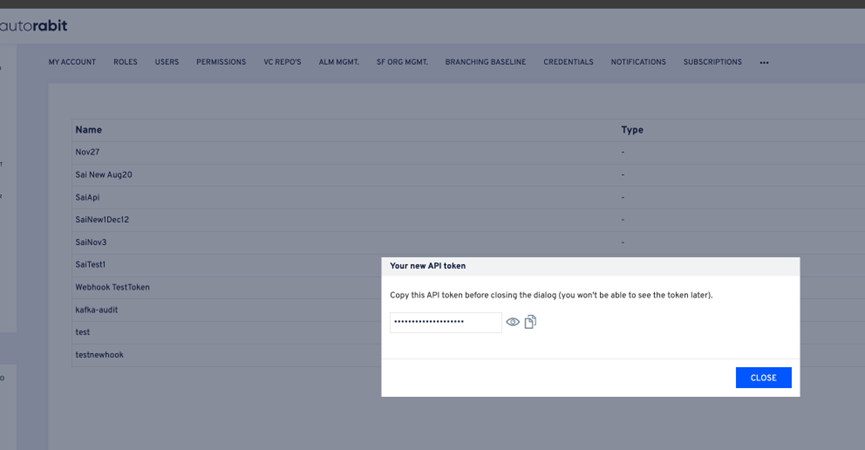
8. Your webhook API token is now created.
***
## B. Create a Webhook with Authentication in Bitbucket
1. Log in to your **Bitbucket** account and open the target repository.
2. Go to **Settings** and select [**Webhooks**](https://knowledgebase.autorabit.com/product-guides/codescan/codescan-integration/webhooks).
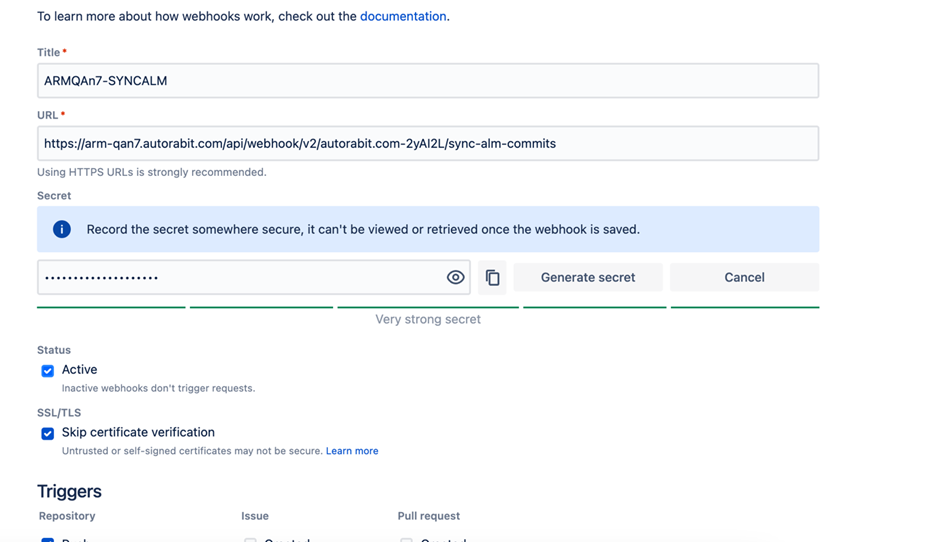
3. In the webhook configuration form, use the following URL formats:
* For SCM push events:
```
https://login.autorabit.com/api/webhook/v2//enterprise/trigger-scm-push-request
```
* For ALM commit syncs:
```
https://login.autorabit.com/api/webhook/v2//enterprise/sync-alm-commits
```
4. Enter the webhook details and click **Save**.
***
## Smart Commits
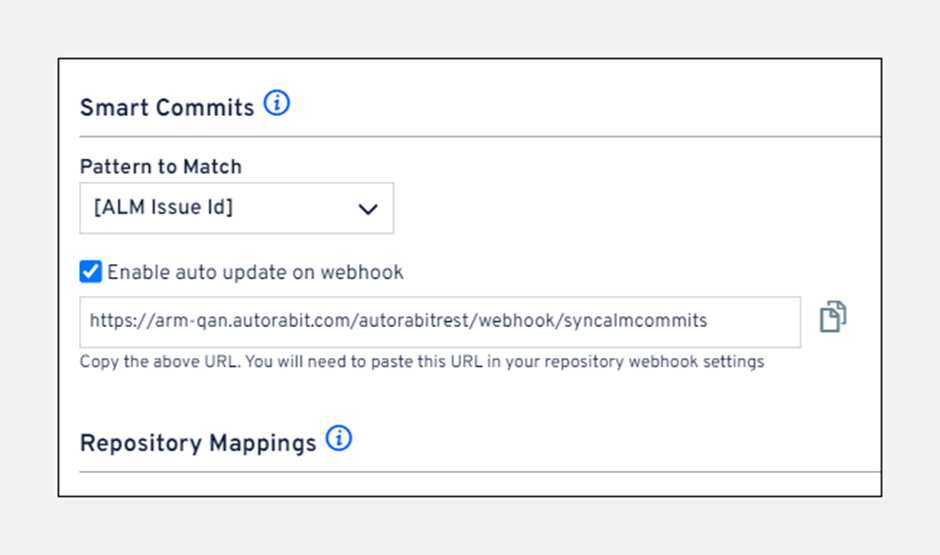
Configure commit message patterns that associate commits with ALM stories.\
Example:
To configure a webhook:
* Enable the **auto update on webhook** checkbox to display the webhook URL.
* For setup in other repository types, refer to the [Webhook Guide](file://product-guides/arm/arm-features/webhooks).
* To integrate with external smart commit systems, see the [Version Control Repositories Summary](file://product-guides/arm/arm-features/version-control/introduction-to-version-control/version-control-repositories-summary).
---
# Agent Instructions
This documentation is published with GitBook. GitBook is the documentation platform designed so that both humans and AI agents can read, navigate, and reason over technical content effectively. Learn more at gitbook.com.
## Querying This Documentation
If you need additional information that is not directly available in this page, you can query the documentation by asking a question.
Perform an HTTP GET request on the following URL with the `ask` and `goal` query parameters:
```
GET https://knowledgebase.autorabit.com/product-guides/arm-1/arm-features/webhooks/configuring-a-webhook-in-bitbucket-enterprise.md?ask=&goal=
```
`ask` is the immediate question: it should be specific, self-contained, and written in natural language.
`goal` is what the user is ultimately trying to achieve, the reason they need the answer. Sharing it helps GitBook give you a better, more relevant answer. A goal is most helpful when it describes the outcome the user wants rather than restating the question. For example, with `ask=how do I create an API token`, a goal like `automate deployments from our CI pipeline` lets GitBook tailor the answer to that use case.
The response will contain a direct answer to the question and relevant excerpts and sources from the documentation.
Use this mechanism when the answer is not explicitly present in the current page, you need clarification or additional context, or you want to retrieve related documentation sections.