> For the complete documentation index, see [llms.txt](https://knowledgebase.autorabit.com/llms.txt). Markdown versions of documentation pages are available by appending `.md` to page URLs; this page is available as [Markdown](https://knowledgebase.autorabit.com/product-guides/arm-1/troubleshoot/known-issues-limitations/arm-known-limitations/version-control.md).
# Version Control
### Version Control Known Limitations
This section summarizes the Version control limits that ARM users should consider:
#### During EZ-Commit
1. Create or append revision to **release** and **commit label** are not supported for the vlocity components deployment.
2. The **custom YAML** file being uploaded does not get saved in ARM.
3. While trying to delete aura components from a Version control branch using the EZ-Commit process in ARM, the Aura components don't get deleted. It still remains available in the version control branch. There is a dependency which prevents deletion of aura components from the version control branch although the components are not available in the Salesforce org.
4. While trying to commit via **previously validated commit labels**, you may not find components listed on the **Deleted** tab. This is expected behavior from our application. To view the deleted components, make sure you use the **Auto Draft** functionality during the EZ-commit process.
5. During an **EZ-Commit**, some of the standard fields like **Account.BillingCountry**, **Account.BillingGeocodeAccuracy**, etc. are not getting fetched from the Salesforce org. This is because there is no proper API to fetch these standard fields from Salesforce.
6. SFDX structure methods (e.g., packages, change sets) are not fully compatible with Vlocity DataPacks, necessitating non-SFDX repositories, therefore, what is suggested is as follows:
**Hybrid Approach**:
* Maintain separate repositories for SFDX and Vlocity components.
* Use SFDX for Salesforce metadata and development, while managing Vlocity components through their own repository and tools.
* Follow the specific guidelines and best practices provided by Vlocity and Salesforce DX for managing and deploying each type of component.
#### During EZ-Merge
1. Merge process in ARM remains valid for **7 days**. Make sure you resolve the merge conflicts (if any) for your merge label and commit the changes to another branch within 7 days or else the merge gets expired. Even merge related reports such as [static code analysis ](https://www.autorabit.com/products/codescan/)reports, deployment validation reports, or difference reports generated also gets expired after **7 days**.
2. Merge via single revision, commit Labels and release Labels is not allowed if the version control repository is in **SFDX** structure.
3. The merge request author is not allowed to approve their own merge request.
4. **Prevalidate Merge** section will be visible only if the admin has enabled the **Merge Setting** checkbox under the **My Account** section.
5. Users with the **Merge Review Overridable** role has special permission to either check or uncheck the pre-validate option. However, each time they try to commit to the branch, a notification alert mail gets triggered to the email id as configured in **My Account > Merge Settings** section.
6. If the **meta-XML** file does not exist in the destination branch and is available in the source branch, then the meta-XML file is copied from the source banch to the destination branch, before committing to the remote repository. The newly added meta-XML file will be added to the files list and will be committed to the remote repository and will also be added to **Validate Deployment** package.
7. AutoRABIT stores the static code analysis source content for **90 days**, post 90 days, the report will auto-deleted.
8. For those PMD/lint report which was generated before **ARM 19.2.1** release, those source content file will not be seen in the static analysis report.
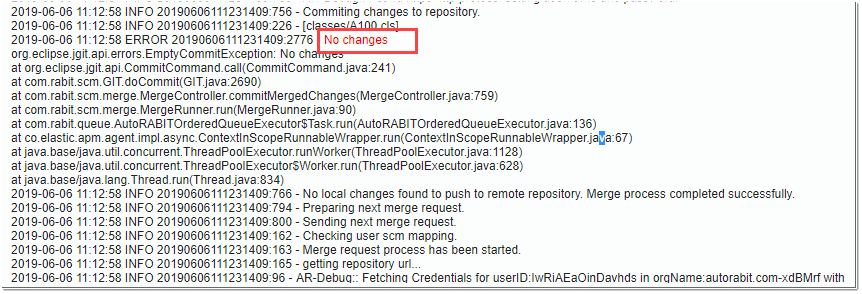
9. For the **Dry Run** merge operation, if a user submits an already merged revision, then the **'Empty Commit Exception'** message gets displayed. See the image below.
10. Users with the **Merge Review Overridable** role also can approve the commit although he does not qualify to do so. In such a scenario, a notification alert mail gets triggered to the email id(s) as configured in **My Account > Merge Settings** page.
11. While resolving merge conflict files via Inline Editor, a situation may arise where the files that you are trying to resolve are improperly resolved. This can lead to the malformation of the conflicted files. To resolve those, you need to download the file locally, work on the conflicted files using your merge tool and make necessary changes to it. Then upload the same.
12. You are allowed to manually edit and correct the code using the Inline Editor only if there are some merge conflicts. When there are no conflicts, editing is not permitted.
13. During Merge initiation, for version control registered in SFDX structure, **Source Folder** selection will not be available.
14. For the merge process where the version control is registered in the SFDX structure, the user will not have the option to create a commit label. The **Create Commit Label** checkbox will be in disabled mode.
#### For Release Label
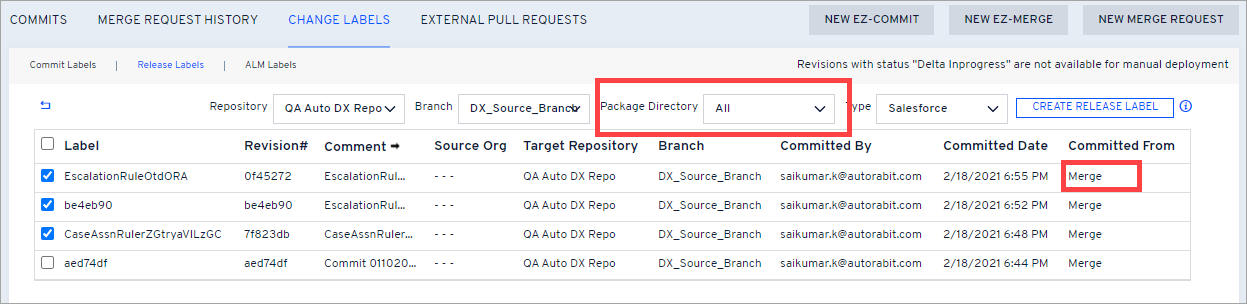
When trying to get the list of commits labels committed from the merge process for your SFDX repository and choosing your package directory, the commit labels result may differ from the actual one. No outcome can be found in some situations. It is therefore recommended to search for commit labels keeping the **Package Directory** as **ALL** until the root cause of the problem is identified.
#### Pull Requests Known Limitations
Below are the limitations of ARM related to Pull request:
1. ARM synchronizes the pull requests to access the latest updates from the repository when clicked. Therefore, to show the latest changes, comments, or any updates, it is recommended to click on the individual pull request.
2. The **Diff** tab will allow you to view the metadata components that were committed to the new branch. However, the response includes a maximum of **300** files.
3. The CI job will get triggered only for the newly created pull requests and are in an **open** state.
4. When the **Pull Request** checkbox is checked during CI Job, some of the options may get withdrawn automatically. For example- Incremental Build, Trigger Build on Commit, or Map ALM Project. This is because such options are not required when the job is triggered via pull request.
5. When pull request is validated via CI job, the **Validate Only** option will be in the selected mode. The user won't be able to uncheck it.
6. To support pull request in ARM, enable the **skip mappings** checkbox under the **Profile** section.
7. **Pull request** is currently not supported for repositories authenticated via **SSH** protocol. However, it does support **HTTPS-based** connection via username and personal access token.
8. Github needs access to the GitHub API, which can only be accessed via HTTP(S) Oauth2 and not SSH.
---
# Agent Instructions
This documentation is published with GitBook. GitBook is the documentation platform designed so that both humans and AI agents can read, navigate, and reason over technical content effectively. Learn more at gitbook.com.
## Querying This Documentation
If you need additional information that is not directly available in this page, you can query the documentation by asking a question.
Perform an HTTP GET request on the following URL with the `ask` and `goal` query parameters:
```
GET https://knowledgebase.autorabit.com/product-guides/arm-1/troubleshoot/known-issues-limitations/arm-known-limitations/version-control.md?ask=&goal=
```
`ask` is the immediate question: it should be specific, self-contained, and written in natural language.
`goal` is what the user is ultimately trying to achieve, the reason they need the answer. Sharing it helps GitBook give you a better, more relevant answer. A goal is most helpful when it describes the outcome the user wants rather than restating the question. For example, with `ask=how do I create an API token`, a goal like `automate deployments from our CI pipeline` lets GitBook tailor the answer to that use case.
The response will contain a direct answer to the question and relevant excerpts and sources from the documentation.
Use this mechanism when the answer is not explicitly present in the current page, you need clarification or additional context, or you want to retrieve related documentation sections.