> For the complete documentation index, see [llms.txt](https://knowledgebase.autorabit.com/llms.txt). Markdown versions of documentation pages are available by appending `.md` to page URLs; this page is available as [Markdown](https://knowledgebase.autorabit.com/product-guides/codescan/issues.md).
# Issues
While running an analysis, CodeScan raises an issue every time a piece of code breaks a coding rule. The set of coding rules are defined by the associated quality profile for each language in the project.
{% hint style="info" %}
**Note:** Each project in CodeScan is treated independently. Issues cannot be compared or Synced between two separate projects (even if they contain the same files and issues).
{% endhint %}
### Issue types
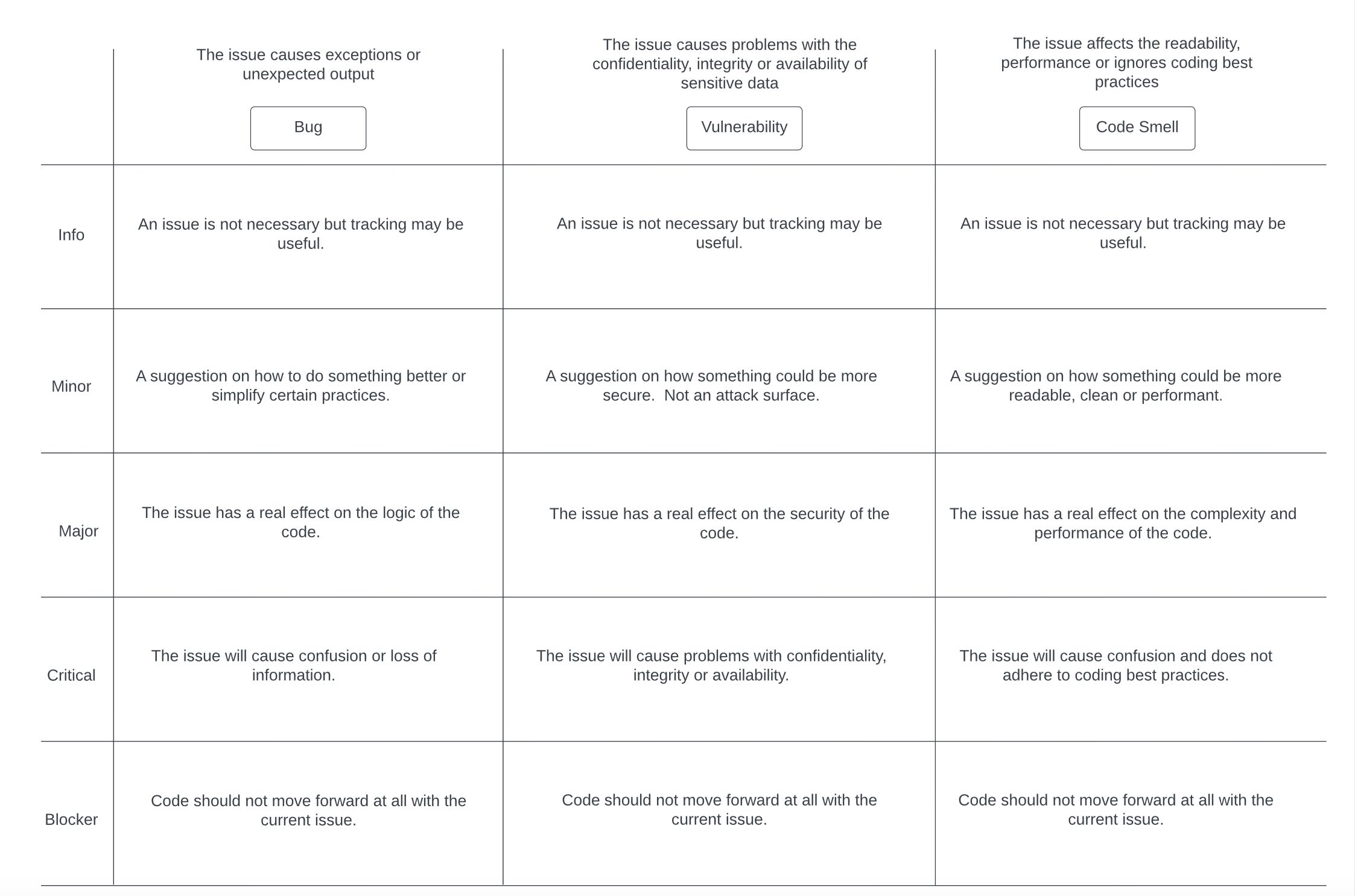
There are three types of issues:
* **Bug:** A coding mistake that can lead to an error or unexpected behavior at runtime.
* **Vulnerability:** A point in your code that's open to attack.
* **Code Smell:** A maintainability issue that makes your code confusing and difficult to maintain.
#### Issue severity
Each issue has one of five severities:
1. `BLOCKER:` Bug with a high probability to impact the behavior of the application in production. For example, a memory leak, or an unclosed JDBC connection are BLOCKERs that must be fixed immediately.
2. `CRITICAL:` Either a bug with a low probability to impact the behavior of the application in production or an issue that represents a security flaw. An empty catch block or SQL injection would be a CRITICAL issue. The code must be reviewed immediately.
3. `MAJOR:` A quality flaw that can highly impact the developer's productivity. An uncovered piece of code, duplicated blocks, or unused parameters are examples of MAJOR issues.
4. `MINOR:` A quality flaw that can slightly impact the developer's productivity. For example, lines should not be too long, and "switch" statements should have at least 3 cases, are both be considered MINOR issues.
5. `INFO:` Neither a bug nor a quality flaw, just a finding.
---
# Agent Instructions
This documentation is published with GitBook. GitBook is the documentation platform designed so that both humans and AI agents can read, navigate, and reason over technical content effectively. Learn more at gitbook.com.
## Querying This Documentation
If you need additional information that is not directly available in this page, you can query the documentation by asking a question.
Perform an HTTP GET request on the following URL with the `ask` and `goal` query parameters:
```
GET https://knowledgebase.autorabit.com/product-guides/codescan/issues.md?ask=&goal=
```
`ask` is the immediate question: it should be specific, self-contained, and written in natural language.
`goal` is what the user is ultimately trying to achieve, the reason they need the answer. Sharing it helps GitBook give you a better, more relevant answer. A goal is most helpful when it describes the outcome the user wants rather than restating the question. For example, with `ask=how do I create an API token`, a goal like `automate deployments from our CI pipeline` lets GitBook tailor the answer to that use case.
The response will contain a direct answer to the question and relevant excerpts and sources from the documentation.
Use this mechanism when the answer is not explicitly present in the current page, you need clarification or additional context, or you want to retrieve related documentation sections.